
The fastest way to update intake protocols and get measurable results is to treat the process as a six-stage operational project: audit current workflows, set goals and governance, redesign flows with explicit exception paths, update forms and consents, integrate a SaaS platform with bidirectional FHIR R4 EMR support, then pilot and measure. Administrators who follow this sequence consistently cut check-in time and free 60–80% of front-desk intake work compared to unstructured rollouts, especially when later adding conversational intake for open-ended clinical sections.
Start today with these five actions:
- Audit every intake touchpoint and capture baseline completion rates, manual intervention counts, and time-to-admit.
- Assign a compliance owner responsible for HIPAA consent language, telehealth disclosures, and state-specific rules.
- Select a pilot cohort — one provider or appointment type — before configuring any forms.
- Require bidirectional FHIR R4 integration in your vendor evaluation criteria.
- Schedule a 2–4 week pilot with daily metric tracking before full rollout.
Smartadmissions maps directly to all six stages: automated intake workflows, real-time eligibility verification, FHIR R4 EMR integration, documentation management, and analytics dashboards. It is the recommended implementation path throughout this guide.
Pro Tip: Harry at Smartadmissions recommends assigning a named project owner before you touch a single form. Without one, intake updates stall at the redesign stage.
Table of Contents
- How to audit your current intake workflows and collect baseline data
- How do you define goals, KPIs, and governance for an intake update?
- How to map and redesign intake workflows with exception handling
- How to update forms, consents, and telehealth disclosures safely
- What SaaS integrations does a digital intake update require?
- How should you design and run an intake pilot?
- What should you measure after intake rollout?
- What does an intake update timeline and budget look like?
- Your 7-step checklist to update intake protocols today
- Key Takeaways
- Why the six-stage approach is the only one worth using
- Smartadmissions cuts intake update time for skilled nursing facilities
- Useful sources and further reading
How to audit your current intake workflows and collect baseline data
Before you revise intake procedures, you need a clear picture of where the current process breaks down. Treating intake as an operational project means establishing a baseline metric, a form inventory, EHR integration details, an internal owner, and a pilot cohort before writing a single new form.
Touchpoints to inventory:
- Referral receipt and triage
- Scheduling call and pre-visit link delivery
- Front-desk arrival and check-in
- Clinical intake and history capture
- Insurance card scan and eligibility verification
- Consent signature collection
- Documentation handoff to the clinical team
Baseline metrics to capture:
| Metric | How to Measure | Target Source |
|---|---|---|
| Form completion rate | Vendor/EHR report | EHR or intake platform dashboard |
| Manual intervention rate | Front-desk time-sampling | Staff tally sheet or PMS log |
| Average time-to-admit | Timestamp delta (referral to bed) | EHR admission log |
| Fields corrected by staff | Audit sample of 20–30 records | Chart review |
| Eligibility verification time | Payer portal or clearinghouse log | Insurance verification system |
| Form abandonment point | Intake platform analytics | Vendor reporting dashboard |
Use EHR and PMS logs for quantitative data, then supplement with a brief observational study: sit with five patients through the full intake sequence and note every manual step your team performs.
Pro Tip: Pull a random sample of 25 completed intake records and count how many fields staff corrected after submission. That single number often reveals more about data quality than your completion rate alone.
How do you define goals, KPIs, and governance for an intake update?
Audit findings are only useful when they translate into specific, measurable targets. Convert each gap into a goal, assign an owner, and set a realistic KPI before any redesign work begins.
Recommended KPIs:
- Pre-visit form completion rate (target: increase by 20–30 percentage points from baseline)
- Manual interventions per 100 visits (target: reduce by at least 50%)
- Average check-in time in minutes
- Eligibility auto-verification rate
- Documentation time saved per visit (minutes)
- Patient satisfaction score on intake experience
| KPI | Baseline Source | Governance Owner |
|---|---|---|
| Pre-visit completion rate | Intake platform report | Project owner |
| Manual interventions/100 visits | Front-desk tally | Operations lead |
| Average check-in time | EHR timestamp | Admissions director |
| Eligibility auto-verification rate | Clearinghouse log | Billing manager |
| Documentation time saved | Staff time-sampling | Analytics owner |
Assign three governance roles: a compliance owner (HIPAA, telehealth disclosures, state rules), a project owner (timeline, vendor coordination, training), and an analytics owner (dashboard setup, reporting cadence). Without this structure, accountability diffuses and KPI reviews stop happening.

Pro Tip: Set stretch and achievable KPIs to balance ambition and early wins. The stretch target keeps momentum; the achievable ones give your team early wins that sustain adoption through the harder rollout phases.
How to map and redesign intake workflows with exception handling
Most practices make a critical mistake when they revise intake procedures: they digitize paper forms one-to-one, skip pilots, or accept one-way EHR integrations that still force manual transcription and reduce ROI. A well-designed intake lifecycle looks like this:
Scheduling → Pre-visit intake → Arrival/check-in → Clinical handoff → Post-arrival reconciliation → Follow-up
The SaaS platform handles the routine path automatically. Your redesign effort should focus on the exception queues: patients who arrive without completed forms, failed eligibility checks, missing IDs, or incomplete consent signatures.
Redesign checklist:
- Map current flows using role swimlanes (front desk, clinical, billing) with decision points labeled.
- Tag every data field as clinical, billing/compliance, or optional. Remove optional fields.
- Define explicit exception queues with a named SOP for each (e.g., “patient arrives without pre-visit form completed”).
- Apply mobile-first design with auto-fill from existing EHR data.
- Use progressive disclosure: ask only what is needed at each stage, not everything upfront.
- Add conversational intake for open-ended clinical history sections. Static forms typically have completion rates of 20–35%; conversational AI intake can raise completion to 55–75%, capturing richer clinical history when implemented with a PHI-ready vendor and careful configuration.
Pro Tip: Train your team on exception scenarios before go-live, not just on the software interface. Exception workflow training is what prevents day-one reversions to paper clipboards when something goes wrong.
How to update forms, consents, and telehealth disclosures safely
Updating client intake forms is not just a design task. Every field and every consent block carries compliance implications under HIPAA, state telehealth rules, and accessibility standards.
Field audit steps:
- Tag each field: clinical necessity, billing/compliance requirement, or optional.
- Remove all optional fields. Each one increases abandonment and adds liability.
- Review consent language with your compliance owner. Default consent text is often too conservative or incomplete for current state telehealth disclosure requirements.
- Keep the signature field on the same page as the consent text.
- Include a preferred language field and provide multilingual support where your patient population requires it.
- Verify WCAG 2.1 AA accessibility compliance for all digital forms.
Schedule a formal compliance review at least annually, or immediately when HIPAA guidance, state telehealth rules, or voicemail policy language changes. Document every review with a date and the reviewer’s name.
Legal note: Compliance-owner review of consent language must be documented. Do not treat default consent configurations as sufficient without a named reviewer signing off.
What SaaS integrations does a digital intake update require?
Technology integration is where intake projects most often fail long term. One-way EHR integrations that attach PDFs to charts force continued manual transcription and eliminate most of the ROI from digitization. Require bidirectional FHIR R4 structured writes in your procurement criteria and contract language.
Integration checklist:
- Bidirectional FHIR R4 support with discrete field writes (not PDF attach)
- Signed Business Associate Agreement (BAA)
- Encryption at rest and in transit
- Role-based access controls
- Six-year audit-trail retention
- Automated payer eligibility verification
- Document upload support (insurance cards, photo ID)
- Structured field mapping to EHR discrete data fields
- Accessibility and multilanguage support
- Sandbox environment for end-to-end testing before go-live
Smartadmissions supports EMR integration with real-time eligibility verification, structured field mapping, and documentation management — covering the full integration checklist above.
Pro Tip: Stage all API credentials in a sandbox and run end-to-end tests with sample records before connecting to your live EHR. A failed write discovered in production costs far more to fix than one caught in testing.
How should you design and run an intake pilot?
A pilot lasting several weeks with a single provider or new-patient appointment type is the lowest-risk way to validate your redesigned intake before facility-wide rollout.
Training checklist by role:
- Front desk: exception workflow SOPs, manual override process, in-office signage setup.
- Clinical staff: how to review discrete intake data in the EHR, flag incomplete histories.
- Billing: eligibility verification results, insurance document review, error escalation path.
Pilot go/no-go criteria:
- Pre-visit completion rate meets or exceeds the target set in your KPI table.
- Staff-corrected fields per 100 visits falls below the baseline by at least 30%.
- Average check-in time meets the target threshold.
- No unresolved exception queue backlogs at end of week two.
Send patient notifications 24–48 hours before their appointment with the pre-visit intake link. Post in-office signage explaining the new process. Assign one staff member as a designated helper during week one to assist patients who arrive without completing the form.
Pro Tip: Start with new patients. They have no prior expectations about your intake process, which makes adoption faster and change management simpler.
What should you measure after intake rollout?
Measurement is not a one-time event. Set up a dashboard before go-live and review it on a fixed cadence.
| Metric | Collection Source | Review Cadence |
|---|---|---|
| Daily completion rate | Intake platform dashboard | Daily (pilot), weekly (post-rollout) |
| Manual interventions/100 visits | Front-desk tally or PMS | Daily (pilot), weekly (post-rollout) |
| Average check-in time | EHR timestamp | Weekly |
| Eligibility verification success rate | Clearinghouse log | Weekly |
| Documentation time saved | Staff time-sampling | Monthly |
| Patient satisfaction score | Post-visit survey | Monthly |
Governance cadence: daily checks during the pilot, weekly ops review for the first 90 days post-rollout, and a monthly executive KPI review thereafter. Any form edit or consent language change must go through a documented change-control process with the compliance owner’s sign-off.
Pro Tip: Assign the analytics owner to send a one-page weekly summary to the admissions director during the first 60 days. Visibility at the leadership level keeps resources allocated and prevents scope creep.
What does an intake update timeline and budget look like?
| Stage | Owner | Typical Duration |
|---|---|---|
| Audit and baseline capture | Project owner | 1–2 weeks |
| Goals, KPIs, and governance setup | Project + compliance owner | 1 week |
| Workflow redesign and form build | Project owner + vendor | 2–6 weeks |
| Compliance and consent review | Compliance owner | 1–2 weeks (parallel) |
| IT integration and sandbox testing | IT + vendor | 2–4 weeks (parallel) |
| Pilot | Admissions director | 2–4 weeks |
| Phased rollout | Project owner | 2–4 weeks (scale-dependent) |
Primary cost drivers:
- Integration complexity: FHIR R4 vs. legacy HL7 connections
- EHR vendor cooperation and API access fees
- Custom form logic and conditional branching
- Conversational AI add-on licensing
- Training hours across roles
- Per-user or per-facility licensing model
ROI calculation: multiply staff hours saved per week by the fully-loaded hourly rate, add the value of faster bed occupancy from reduced time-to-admit, and subtract total implementation and licensing costs. Reduced transcription errors also lower downstream billing correction costs, which belong in the ROI model.
Your 7-step checklist to update intake protocols today
Use this checklist to assign ownership and due dates across your team. Each step maps to the six-stage lifecycle above.
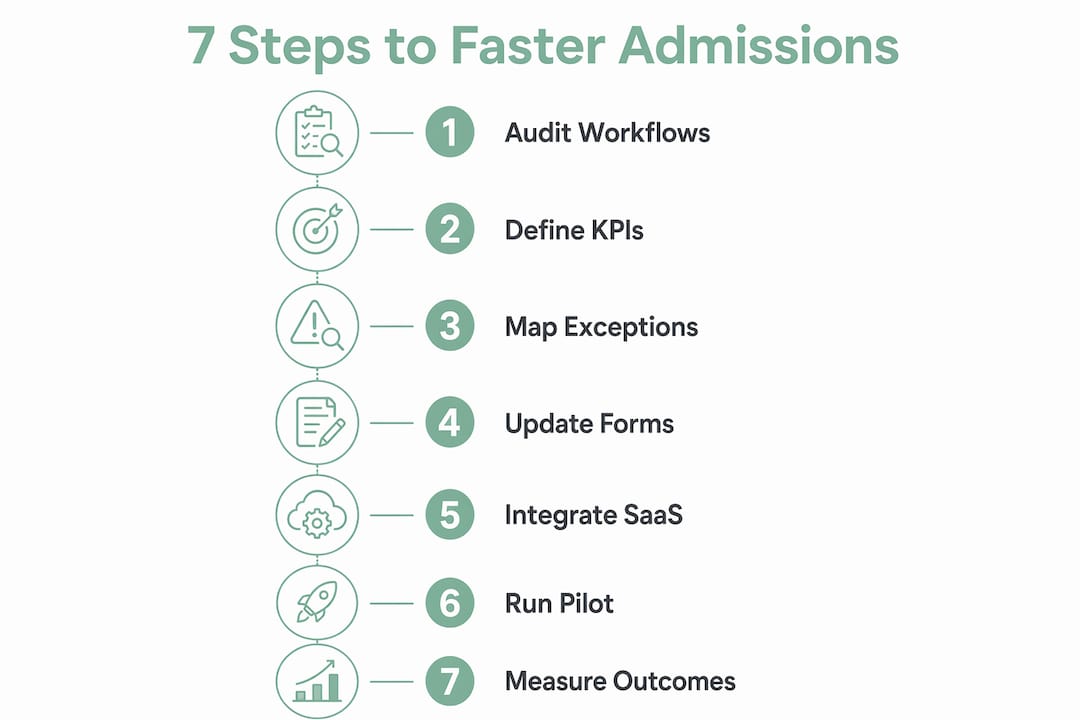
- Audit intake touchpoints — Project owner — Week 1. Map every data collection point and capture baseline metrics using EHR logs and front-desk time-sampling. See the patient intake checklist for skilled nursing homes for a ready template.
- Set goals and KPIs — Admissions director — Week 2. Translate audit gaps into 3–5 measurable targets with named owners.
- Redesign workflows — Project owner + clinical lead — Weeks 2–4. Map swimlanes, define exception queues, and apply mobile-first design principles. Review intake workflow improvement ideas for additional tactics.
- Update forms and consents — Compliance owner — Weeks 3–5. Remove optional fields, review consent language, and verify WCAG 2.1 AA compliance.
- Configure SaaS integration — IT lead + vendor — Weeks 3–6. Confirm FHIR R4 bidirectional writes, BAA, and complete sandbox testing.
- Run the pilot — Admissions director — Weeks 6–9. Execute 2–4 week pilot, track daily KPIs, and apply go/no-go criteria before expanding.
- Measure and iterate — Analytics owner — Ongoing. Set up the dashboard, run governance reviews, and route all form changes through the compliance owner.
Key Takeaways
Updating intake protocols delivers the fastest, most measurable results when you follow a six-stage operational sequence and require bidirectional FHIR R4 integration from day one.
| Point | Details |
|---|---|
| Audit before building | Capture completion rate, manual interventions, and time-to-admit before changing any form. |
| Assign governance roles | Name a compliance owner, project owner, and analytics owner before redesign begins. |
| Require FHIR R4 writes | One-way PDF integrations force continued transcription and eliminate long-term ROI. |
| Pilot with new patients first | A 2–4 week single-provider pilot reduces change-management risk and validates KPIs before full rollout. |
| Smartadmissions implementation | Smartadmissions covers all six stages: automated workflows, eligibility verification, FHIR R4 EMR integration, and analytics dashboards. |
Why the six-stage approach is the only one worth using
Most intake update projects fail not because the technology is wrong but because the sequence is wrong. Facilities choose a vendor before auditing, configure forms before assigning a compliance owner, and skip the pilot because the timeline feels tight. The result is a digital system that mirrors all the friction of the paper process it replaced.
The six-stage model works because it forces the hard decisions early: what does your baseline actually look like, who owns compliance, and what counts as a successful pilot? Those answers shape every downstream configuration choice. Facilities that skip the audit phase routinely discover, six months post-launch, that their completion rate looks good (20–35% for static forms, but up to 55–75% for conversational AI intake) while their data quality is poor — exactly the failure mode that measurement without quality metrics produces.
Exception workflow training deserves particular attention. The routine path is easy to automate. What separates a resilient intake system from a fragile one is how your team handles the patient who arrives without a completed form, the eligibility check that fails, or the consent signature that is missing. Train on those scenarios first, and your go-live will be far smoother than facilities that trained only on the software interface.
Smartadmissions cuts intake update time for skilled nursing facilities
Faster bed occupancy starts with a shorter gap between referral receipt and completed intake. Smartadmissions delivers that by automating the full six-stage intake lifecycle: pre-visit form delivery, real-time insurance eligibility verification, FHIR R4 bidirectional EMR integration, structured field mapping, and analytics dashboards that surface completion rates and manual interventions daily.
[IMAGE:cta_image alt=“how to update intake protocols with Smartadmissions”]
Facilities using Smartadmissions reduce transcription hours, accelerate automated admissions, and give compliance owners a documented audit trail for every consent and form change. The platform is built specifically for skilled nursing homes, rehabilitation centers, and post-acute care providers — so the integration checklist, exception workflows, and reporting cadence described in this guide are already built into the product. Request a demo at smartadmissions.ai to see how it maps to your facility’s current intake gaps.
Useful sources and further reading
- How to Implement Digital Patient Intake: A Step-by-Step Guide for Practices — Perspective AI. Covers the five pre-requirements, common failure modes, FHIR R4 integration guidance, and pilot design. Primary source for audit, redesign, technology integration, and pilot sections.
- Patient Intake Forms: Free Printable Template — Commure. Practical guidance on consent language review, compliance-owner assignment, and annual form audit cadence. Referenced in forms/consents and governance sections.
- Patient Intake Procedures: Essential Definitions & Processes — ACM Scribe (ACMSO). Source for exception workflow training guidance and the Safwan Azeem insight on scenario-based staff preparation.
- Digital Patient Intake: Complete Guide for Healthcare Practices — Certinal. Phased rollout roadmap and vendor evaluation checklist; useful for implementation timeline planning.
- Creating Effective Intake Forms: A Guide for Therapists — SimplePractice. HIPAA compliance checklist, Good Faith Estimate requirements, and accessibility format guidance including WCAG considerations.
- HIPAA for Professionals — U.S. Department of Health & Human Services. Primary regulatory source for HIPAA compliance requirements applicable to all intake consent language and data handling.
“Intake forms should be reviewed at least annually or whenever there is a significant change in consent, privacy language, or state telehealth requirements — and that review must be documented by a named compliance owner.” — Best practice synthesis from Commure and SimplePractice guidance.