
TL;DR:
- Following strict steps in the admission process, linking decisions to source documents, prevents denials and mismatches. Starting with complete minimal data capture, verification of source documents, and payer eligibility ensures a smooth workflow. Automating these steps with smart tools cuts manual effort and reduces delays in patient admission and reimbursement.
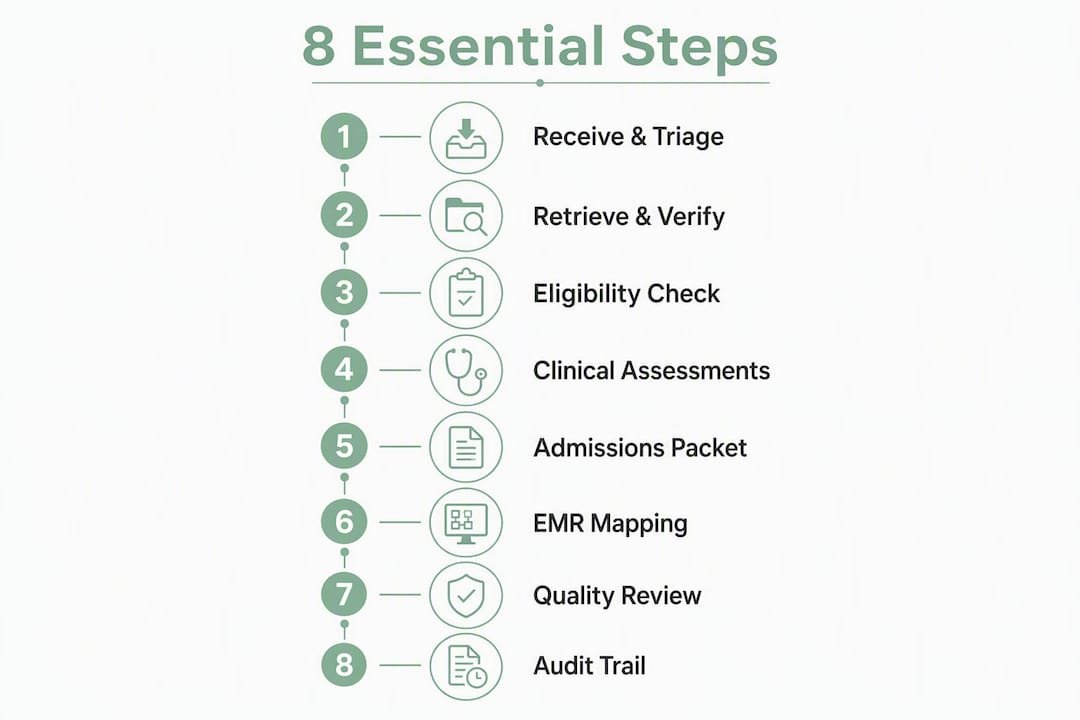
The clinical record management steps for admissions intake are: (1) receive and triage the referral, (2) retrieve and verify source documents, (3) check payer eligibility and prior authorization, (4) complete clinical screening and standardized assessments, (5) assemble the admissions packet and obtain consents, (6) file and index documents in the EMR, (7) conduct quality review and coding linkage, and (8) close the audit trail and reconcile post-admit. Following these steps in sequence, and linking every clinical decision back to its source document, protects your facility from reimbursement denials and clinical mismatches before the patient ever arrives.
A referral packet often runs dozens of pages across clinical notes, medication lists, labs, and therapy evaluations. Without a structured sequence that ties each decision to a specific document location, your team is one missing signature away from a denied claim or a bad-fit admission.
Your admissions documentation checklist should map directly to these eight steps. Here is a quick-reference list with the role that owns each phase:
- Step 1 — Receive & triage: Admissions coordinator
- Step 2 — Retrieve & verify source docs: Admissions coordinator + nurse liaison
- Step 3 — Payer eligibility & prior auth: Financial/insurance specialist
- Step 4 — Clinical screening & assessments: Nurse liaison + intake clinician
- Step 5 — Assemble packet & consents:
- Admissions coordinator
- Step 6 — EMR filing & indexing: Health information / EMR specialist
- Step 7 — QA, coding & authorization submission: Clinical director + coder
- Step 8 — Audit trail & post-admit reconciliation: Compliance officer + admissions coordinator
Table of Contents
- What should you capture when the referral first arrives?
- How do you retrieve and verify the right source documents?
- How should you run payer eligibility and prior authorization at intake?
- What clinical assessments should you complete before saying yes?
- What goes into the admissions packet, and who signs what?
- How do documents map into the EMR after intake?
- How do you run quality review and prepare for authorization submission?
- What does a complete audit trail look like after admission?
- How long does each step take, and what drives the cost?
- What are the most common failure modes, and how do you prevent them?
- How does Smartadmissions operationalize these steps?
- Key Takeaways
- What the “fast yes” really costs admissions teams
- Smartadmissions cuts review time without cutting corners
- Useful sources and further reading
What should you capture when the referral first arrives?
The moment a referral lands, your admissions coordinator needs to log a minimum data set before anything else moves forward. Missing even one field at this stage forces rework downstream and delays bed placement.
| Capture Field | Owner | Notes |
|---|---|---|
| Patient demographics (name, DOB, MRN) | Admissions coordinator | Verify against sending hospital ID |
| Admitting diagnosis (primary + secondary) | Admissions coordinator | Flag complex diagnoses for clinical director |
| Sending hospital and discharge planner contact | Admissions coordinator | Establish direct nurse-to-nurse channel |
| Anticipated bed need date | Admissions coordinator | Tie to bed-availability check |
| Insurance/payer and member ID | Financial specialist | Needed for Step 3 eligibility run |
| Point of contact (patient/family) | Admissions coordinator | Required for consent workflow |
Hospitals can face fines for missing required documentation, so establishing a direct nurse-to-nurse communication channel at first contact is not optional. Once the minimum fields are captured, the coordinator applies a quick accept/hold/decline rule: accept if all fields are present and payer is confirmed; hold if documents are pending; escalate to the clinical director if the diagnosis flags infection risk, bariatric needs, or behavioral complexity.
High-performing admissions teams run clinical review, financial verification, and facility-fit assessment in parallel rather than sequentially, which prevents the packet from stalling at any single checkpoint.
How do you retrieve and verify the right source documents?
Every downstream decision, from PDPM coding to prior authorization, depends on what you pull here. Request all of the following from the sending facility:
- Hospital history and physical (H&P) with attending signature and date
- Operative notes (if surgical within the last 30 days)
- Current medication list with dosages and prescriber
- Recent labs (CBC, BMP, wound cultures where applicable)
- Therapy evaluations (PT, OT, SLP)
- Discharge summary or interim summary if discharge has not yet occurred
Verification means confirming that dates are current, identifiers match across all documents, and required signatures are present. Flag any missing item immediately and log it in the referral record with a timestamp.
Pro Tip: Tag every extracted clinical claim to its source document location, for example “fall risk: H&P page 3, paragraph 2,” so any downstream reviewer, coder, or payer auditor can validate the evidence in seconds rather than re-reading the entire packet.
How should you run payer eligibility and prior authorization at intake?
Run real-time eligibility before the clinical team invests significant review time. Capture a snapshot of the eligibility response and attach it to the referral record.
| Check | What to Document | Where to Store |
|---|---|---|
| Medicare/Medicaid SNF coverage | Benefit days remaining, coverage period | Referral packet, payer section |
| Commercial/managed care benefits | Co-pay, prior auth requirement, network status | Referral packet, payer section |
| Prior authorization requirement | Auth number, approval window, covered services | Packet + EMR payer field |
| Payer contact and confirmation ID | Rep name, call reference number, date/time | Audit log |
For prior authorization, the evidence bundle typically needs to include the primary diagnosis, recent surgical history, and medication costs for high-cost drugs. CMS prior-authorization API rules (CMS-0057-F) phase in through 2027, making it increasingly important to carry referral evidence forward from intake directly into the authorization request rather than rebuilding it later.
Document the authorization window clearly. If the window is tight or the payer requires additional clinical evidence, flag the case for appeals preparation before the patient is admitted.
What clinical assessments should you complete before saying yes?
A clinical “yes” without a standardized screening form is a liability. Your screening tool should capture:
| Assessment Item | Source Document Link | PDPM/MDS Relevance |
|---|---|---|
| Primary and secondary diagnoses | H&P, discharge summary | PDPM clinical category |
| Medical complexity (wounds, IV meds, vents) | Nursing notes, med list | Nursing component |
| Fall risk score | PT evaluation, nursing assessment | Section GG |
| Infection status (MRSA, C. diff, COVID) | Lab results, isolation notes | Infection control flag |
| Functional GG items (mobility, self-care) | OT/PT evaluations | Section GG, PDPM NTA |
| Cognitive status | Physician notes, social work eval | MDS Section C |
PDPM-focused pre-admission checks require the primary diagnosis, surgical history for the last 30 days, and GG section items to accurately prepare for MDS and payment classification. The nurse liaison owns the clinical determination; the intake clinician documents the rationale and links each conclusion to the specific page and line in the source document.
Pro Tip: Never record a screening conclusion as a standalone finding. Write it as “fall risk HIGH per PT eval, page 2” so the MDS coordinator can verify the source without contacting the sending hospital again.
What goes into the admissions packet, and who signs what?
Once screening clears, the admissions coordinator assembles the packet. A complete packet includes:
- Face sheet with verified demographics and payer information
- Signed consent for treatment and release of information
- Advance directive or POLST (or documented refusal)
- Medication reconciliation form signed by the admitting nurse
- Insurance authorization forms and eligibility snapshot
- Physician certification (required within 30 days of admission for Medicare SNF benefit, with recertification at day 14)
- Facility-specific financial agreement
File-naming convention matters for rapid retrieval. Use a consistent format: [LastName_FirstName]_[MRN]_[DocumentType]_[YYYYMMDD]. Organize folders by document category so the EMR import maps cleanly. Designing these forms to meet HIPAA-compliant intake standards from the start prevents re-work during audits and protects patient data throughout the intake process.
How do documents map into the EMR after intake?
Every document imported into the EMR needs a metadata template completed at the time of filing.

| Metadata Field | Example Value | Purpose |
|---|---|---|
| Document type | Hospital H&P | Enables indexed search |
| Source facility | St. Mary’s Medical Center | Provenance tracking |
| Author/signer | Dr. J. Patel, MD | Signature verification |
| Document date | 2026 | Currency check |
| Evidence link | H&P p.3, para.2 | Downstream audit support |
Map discrete fields directly into EMR fields: diagnosis codes into the problem list, medications into the medication module, allergies into the allergy record. This eliminates double entry and reduces transcription errors. After import, run a verification pass: confirm that ADT events fired correctly, HL7/ADT messages transmitted, and C-CDA documents indexed under the right encounter. EMR integration done correctly means your clinical team sees a complete, structured record on day one rather than a stack of scanned PDFs.
How do you run quality review and prepare for authorization submission?
Before submitting for authorization or completing the 5-day PDPM assessment, run a QA pass against this checklist:
- Evidence provenance present for every clinical conclusion
- Medication list matches across H&P, discharge summary, and reconciliation form
- Primary diagnosis confirmed and coded correctly (ICD-10)
- Payer-specific rules flagged (e.g., managed care requires separate auth for wound care)
- Coder has reviewed the evidence bundle and signed off on PDPM clinical category
Conflicts go to the clinical director first. If the conflict involves payer rules, the payer liaison joins within 24 hours. Coding disputes escalate to the MDS coordinator. Resolution timelines should be documented in the audit log with actor, timestamp, and outcome.
What does a complete audit trail look like after admission?
Every decision in the intake workflow needs a traceable entry. A complete audit record contains:
| Audit Field | Example |
|---|---|
| Timestamp | 2026 |
| Actor (role + name) | Admissions Coordinator, M. Torres |
| Decision or action | Accepted referral; payer eligibility confirmed |
| Evidence link | Eligibility snapshot attached |
| Version/amendment note | None (original entry) |
Post-admit reconciliation follows this sequence:
- Compare the admission packet against the live EMR record within 24 hours of admit.
- Confirm that diagnoses, medications, and allergies match across both sources.
- Log any discrepancy as an amendment with the original value, corrected value, actor, and timestamp.
- Store an immutable snapshot of the original packet in a read-only archive folder for appeals and authorization reviews.
Retention schedules vary by state, but Medicare conditions of participation generally require clinical records to be retained for at least five years from the date of discharge, or three years for minors after they reach age 18, whichever is longer. Confirm your state’s specific requirement with your compliance officer.
How long does each step take, and what drives the cost?
| Step | Target Time per Referral | Primary Role |
|---|---|---|
| Step 1: Receive & triage | 10 min | Admissions coordinator |
| Step 2: Retrieve & verify docs | 20–30 min | Coordinator + nurse liaison |
| Step 3: Eligibility & prior auth | 15 min | Financial specialist |
| Step 4: Clinical screening | 20–30 min | Nurse liaison |
| Step 5: Packet assembly | 15 min | Admissions coordinator |
| Step 6: EMR filing | 10 min | HIM/EMR specialist |
| Step 7: QA & coding | 15 min | Clinical director + coder |
| Step 8: Audit & reconciliation | 10 min | Compliance + coordinator |
| Total (manual) | ~120 min | Multiple roles |
Each 24-hour delay in the admission process can cost a facility approximately $450 per bed in lost revenue. The major cost drivers are manual data entry across multiple systems, verification rework from incomplete packets, delayed authorizations, and avoidable denials from missing provenance. Facilities with three or more admissions coordinators typically assign Steps 1–3 to one role and Steps 4–7 to a clinical-financial pair, with a compliance officer owning Step 8.
What are the most common failure modes, and how do you prevent them?
The “fast yes” is the single most expensive mistake in SNF admissions. Accepting a referral without verified eligibility, complete source documents, and a provenance-linked clinical screening creates a chain of downstream problems: clinical mismatch on arrival, authorization denial, and a billing dispute that takes weeks to resolve.
Admissions experts warn that “fast yes” decisions cause clinical mismatches or reimbursement denials unless every assessment links back to the source document. Consider a facility that accepts a complex wound-care patient based on a verbal summary. The prior authorization is denied because the medication cost evidence was never attached. The patient is already admitted. The facility absorbs the cost while appealing.
| Failure Mode | Root Cause | Mitigation |
|---|---|---|
| Missing provenance | Claims recorded without source links | Require page/line citation for every clinical conclusion |
| Late eligibility check | Financial review runs after clinical review | Gate clinical screening on eligibility confirmation |
| Incomplete med reconciliation | Medication list not cross-checked | Three-source check: H&P, discharge summary, pharmacy |
| Single-threaded workflow | Steps run sequentially, not in parallel | Assign clinical, financial, and facility-fit reviews simultaneously |
| No authorization gating | Admission proceeds before auth confirmed | Mandatory auth confirmation field before bed assignment |
How does Smartadmissions operationalize these steps?
Smartadmissions maps directly to each of the eight steps through purpose-built features that reduce manual effort while preserving the auditability your team needs.
| Step | Smartadmissions Feature | What It Does |
|---|---|---|
| Receive & triage | Automated referral intake | Captures minimum data set from fax, email, or portal; flags incomplete packets |
| Retrieve & verify docs | Intelligent document processing (IDP) | Extracts clinical data from PDFs and links claims to source page/line |
| Eligibility & prior auth | Real-time eligibility verification | Queries payer portals and stores the eligibility snapshot in the referral record |
| Clinical screening | AI-assisted clinical assessment | Surfaces structured screening summary with evidence links for nurse liaison review |
| Packet assembly | Document management module | Organizes, names, and prepares packet for EMR import |
| EMR filing | EMR integration (HL7/FHIR) | Maps discrete fields into your EMR; triggers ADT events automatically |
| QA & coding | Configurable quality scoring | Flags completeness gaps and payer-rule conflicts before submission |
| Audit trail | Immutable audit log | Records every decision with actor, timestamp, and evidence link |
AI-powered intake can reduce administrative workload for referral processing by roughly 80% for facilities that adopt intelligent document processing and automation. In one documented example, a provider doubled referral conversion from 20.7% to 44.8% and processed 38% more referrals with the same staff after adopting AI-powered referral workflows. Smartadmissions recommends a pilot scope of 20–30 referrals with two admissions coordinators and one nurse liaison to validate extraction accuracy and EMR mapping before full rollout.
Key Takeaways
Structured clinical record management steps, applied in sequence with source-document provenance at every decision point, are the most reliable way to protect reimbursement and clinical fit from referral to admit.
| Point | Details |
|---|---|
| Follow all 8 steps in order | Skipping or reordering steps, especially eligibility before clinical screening, is the leading cause of denials. |
| Link every decision to its source | Tag each clinical conclusion to the document page and line so coders, payers, and auditors can verify without re-reading the packet. |
| Avoid the “fast yes” | Accepting without verified eligibility and complete provenance costs roughly $450 per bed per day in delayed or denied revenue. |
| Parallelize clinical and financial reviews | Running clinical, financial, and facility-fit checks simultaneously cuts total review time and prevents bottlenecks. |
| Smartadmissions automates the workflow | The platform covers all eight steps, from IDP extraction to immutable audit logs, reducing manual workload and supporting faster, safer admits. |
What the “fast yes” really costs admissions teams
The conventional wisdom in SNF admissions is that speed wins referrals. That is partially true. Sending hospitals do favor facilities that respond quickly, and a slow response often means losing the referral to a competitor. But speed without structure is where the real financial damage happens.
The step most teams skip under pressure is provenance linking. A coordinator accepts a referral, the clinical team does a verbal review, and the packet moves forward without a single source-document citation attached to the clinical conclusions. Three weeks later, the authorization is denied because the payer cannot verify the wound-care complexity that justified the skilled level of care. The appeal takes 45 days. The revenue is delayed or lost entirely.
What actually works is parallel processing with mandatory evidence gates. Clinical review, financial verification, and facility-fit assessment run at the same time, not in sequence. No step advances to bed assignment without a confirmed eligibility snapshot and at least one source-document citation per clinical conclusion. That discipline takes two to three weeks to build into team habits, but it pays back in fewer denials and faster authorization approvals.
Smartadmissions cuts review time without cutting corners
Faster referral decisions and airtight documentation are not a trade-off when your workflow is built on the right platform. Smartadmissions gives admissions coordinators, nurse liaisons, and clinical directors a single workspace where every one of the eight steps is supported, from automated packet extraction to real-time eligibility checks and immutable audit logs.
Three reasons admissions teams at skilled nursing and post-acute facilities choose Smartadmissions:
- Evidence-linked decisions: IDP extracts clinical data and tags every finding to its source document, so your team reviews conclusions, not raw PDFs.
- Real-time eligibility at intake: Payer verification runs at Step 1, not after the clinical team has already invested 30 minutes on a referral that will not convert.
- EMR integration from day one: HL7/FHIR mapping pushes discrete data directly into your existing EMR, eliminating double entry and reducing post-admit reconciliation time.
See how referral documentation best practices translate into faster bed occupancy, then request a demo to see the platform in your workflow.
Useful sources and further reading
Templates and references your admissions team should bookmark:
- Clinical Documentation Essentials: 2026 Admissions Guide — Packet structure and PDPM documentation best practices
- Admissions Documentation Checklist: 10 Critical Steps — Ready-to-use checklist aligned to the eight steps above
- How to Integrate EMR with Referrals for Streamlined Intake — Implementation guide for HL7/FHIR field mapping
- HIPAA-Compliant Forms for Specialty Practices — Guidance on structuring consent and intake forms to meet HIPAA standards
| Resource | Best Used For |
|---|---|
| Richter SNF Best Practices Ebook | PDPM prep, MDS Section GG fields, communication protocols |
| Smartadmissions Admissions Checklist | Daily intake workflow and SOP development |
| Itirra “Fast Yes” Analysis | Risk training and denial-prevention policy |
| Smartadmissions EMR Integration Guide | Technical setup for HL7/FHIR field mapping |
| Zensweb HIPAA Forms Guide | Consent form design and audit-ready documentation |
This article provides general operational guidance for admissions workflow planning. Confirm current CMS conditions of participation, state retention requirements, and payer-specific authorization rules with your compliance officer or a qualified healthcare attorney.