
TL;DR:
- Implementing a formal patient intake policy ensures data accuracy, regulatory compliance, and improved patient experience. It involves defining clear procedures for data collection, consent, accessibility, security, and contingency plans, supported by regular reviews and staff training. Automating high-impact steps like eligibility verification reduces claim denials and enhances operational efficiency.
A patient intake policy is a written, auditable standard that governs how your facility collects, validates, stores, and routes patient data at first contact — owned jointly by admissions, compliance, and IT. Before you read further, run this quick audit check against your current process:
- EMR field mapping confirmed: every intake field maps to a named EMR field or encounter identifier
- Consent and signature on the same page: auditors flag separated signature lines as invalid
- Real-time eligibility verification active: insurance status confirmed before or at registration, not after
- Accessibility accommodations documented: staff-assisted intake available as a formal fallback, per ADA requirements
- Downtime procedure written and tested: manual fallback exists for system outages
- Retention schedule current: HIPAA sets a six-year floor for privacy notices and authorizations; state law governs medical records
Facilities that automate eligibility checks and digital intake see measurable reductions in phone time per appointment and claim denial rates — the operational case for treating intake as a strategic process, not a clerical one.
Table of Contents
- What is patient intake policy and why does a formal written policy matter?
- What mandatory sections should every patient intake policy include?
- What should you collect on intake forms, field by field?
- Where does intake commonly break, and what are the compliance risks?
- How do you build or revise a patient intake policy step by step?
- What technology and EMR integration should your intake platform require?
- What roles, SOPs, and training does an audit-ready intake program need?
- Which KPIs should you track for intake performance and compliance?
- Copyable policy checklist and a short template you can adapt
- Key Takeaways
- What practitioners get wrong about intake modernization
- Faster admissions start with the right platform behind your policy
- Authoritative sources and further reading for policy and technical reference
What is patient intake policy and why does a formal written policy matter?
Patient intake is the end-to-end process of collecting, verifying, and routing the clinical, demographic, and financial data needed to register a patient and initiate care. It sits upstream of billing, clinical documentation, and the audit trail — which means errors at intake compound downstream. Registration is the administrative act of creating the patient record; intake is the broader process that feeds it. Referral intake, common in skilled nursing and post-acute settings, adds a clinical triage layer before registration even begins.
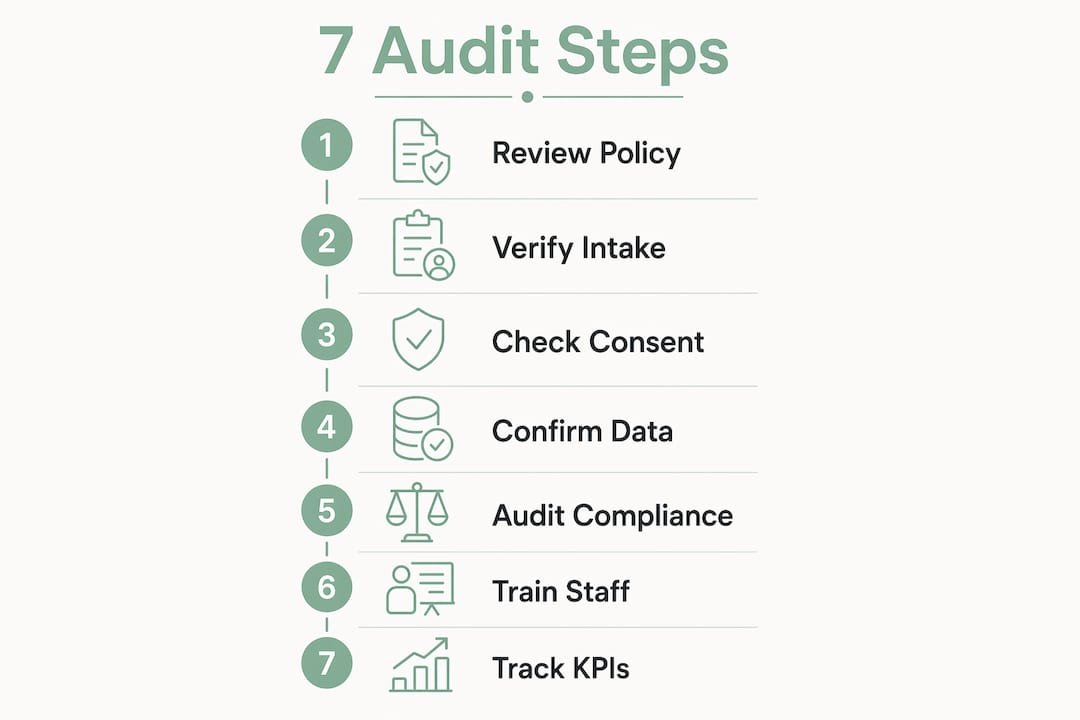
A written policy matters for three concrete reasons. First, it creates a documented standard that survives staff turnover — without it, intake quality depends entirely on individual habit. Second, it protects revenue: intake forms are the final document examiners reference during records audits, and unstructured or incomplete data produces billing errors and denials. Third, it anchors the patient experience — a consistent, accessible intake process reduces wait times and builds trust before care begins.
The business case is direct. Facilities that treat intake as a strategic operational foundation rather than clerical paperwork see fewer claim denials, faster bed occupancy, and cleaner audit findings. The difference between a facility with a written intake policy and one without shows up most clearly during a payer audit or a state survey — and by then, it is too late to retrofit.
Core value propositions of a formal intake policy:
- Data accuracy and audit readiness: structured fields and validation rules prevent the free-text errors that trigger audit flags
- Revenue protection: real-time eligibility and prior authorization checks at intake reduce denials before a claim is ever submitted
- Patient experience: pre-visit digital forms, clear consent language, and accommodation planning reduce check-in friction for every patient
What mandatory sections should every patient intake policy include?
A policy without defined sections is a memo, not a standard. Your intake policy document should contain the following sections at minimum, each with a named owner and a review cadence.
Recommended policy sections and owners:
- Purpose and scope (Admissions Director): defines what the policy covers, which patient populations it applies to, and which facility locations or service lines it governs
- Definitions (Compliance Officer): standardizes terms — intake, registration, referral intake, encounter, BAA, PHI — so staff interpret procedures consistently
- Roles and responsibilities (Admissions + HR): names the owner of each intake function and the escalation path when a step fails
- Intake data standard (IT + Billing): specifies required fields, acceptable formats, and EMR field mappings
- Consent handling (Compliance): documents how informed consent and HIPAA Notice of Privacy Practices are presented, signed, and stored
- Accessibility accommodations (Compliance + Front Desk Lead): describes staff-assisted intake procedures and alternative format availability
- EHR and BAA requirements (IT): lists approved platforms, required security controls, and vendor agreement status
- Audit and retention (Compliance): sets retention schedules aligned with HIPAA minimums and applicable state law
- Downtime and contingency (IT + Admissions): documents the manual fallback procedure and recovery steps
Policy review cadence: review the full policy annually, with an interim review triggered by any of the following — a payer audit finding, a system change, a regulatory update, or a staff error pattern identified in QA reporting. Document each review with a version number, reviewer names, and approval signatures.
Pro Tip: Place the policy approval signature block on the cover page, not the last page. Auditors reviewing a multi-page document expect to find authorization at the front — a signature buried on page 12 is frequently overlooked and can create the impression the document was never formally approved.
What should you collect on intake forms, field by field?
Intake forms that feed the EMR correctly require deliberate field design, not just a list of questions. Group fields logically, apply validation rules at the point of entry, and map every field to its EMR counterpart before the form goes live.

| Field Group | Required Fields | Format / Validation | EMR Mapping Note |
|---|---|---|---|
| Identifier / Contact | Legal name, DOB, address, phone, preferred contact method | DOB: MM/DD/YYYY; phone: 10-digit; preferred contact: dropdown | Map to patient master record; capture unique patient ID |
| Access needs / Language | Primary language, interpreter needed (Y/N), disability accommodations | Dropdown for language; checkbox for accommodation types | Flag for scheduling and clinical team |
| Insurance / Billing | Primary payer, member ID, group number, secondary insurance, guarantor | Member ID: alphanumeric; capture front/back card image | Map to billing encounter; trigger eligibility check |
| Reason for visit / Triage | Chief complaint, referral source, urgency level | Free text + urgency dropdown | Route to clinical queue or referral intake workflow |
| Medical / Surgical history | Diagnoses, surgeries, hospitalizations, functional status | Structured checkboxes + free text for detail | Map to clinical history section of EMR |
| Medications / Allergies / Consents | Current medications (name, dose, frequency), known allergies, HIPAA NPP acknowledgment, treatment consent | Medication: structured entry preferred; allergy: NKDA checkbox + free text; consents: e-signature with timestamp | Allergy field must support NKDA; consent timestamp stored with signature |
Additional field guidance:
- Capture secondary insurance on the same screen as primary — do not make it a separate workflow step, or staff will skip it under time pressure
- Store e-signature timestamps in UTC and display them in local time; this protects the audit record if time zones are ever questioned
- Preferred contact method (phone, text, email, portal) should drive your automated reminder workflow, so treat it as a required field, not optional
Pro Tip: Keep consent text and the signature line on the same page — always. Auditors flag consent forms where the signature is on a separate page as potentially invalid, even when patient intent was clear. This applies to both paper and digital forms.
Where does intake commonly break, and what are the compliance risks?
Most intake failures are predictable. They cluster around a handful of recurring failure modes, each with a specific compliance consequence.
Top failure modes and mitigations:
- Incomplete patient identifiers: missing DOB or member ID creates duplicate records and billing rejections; fix with required-field validation at the point of entry
- Separated consent and signature pages: an audit red flag; co-locate them on every form, digital and paper
- Delayed eligibility checks: verifying insurance after the visit rather than before it produces denials that are difficult to appeal; require real-time eligibility as a workflow gate before scheduling confirmation
- Duplicate records: occur when staff create new records instead of searching first; enforce a patient search step in your SOP before any new record is created
- Language and access barriers: patients who cannot complete forms independently produce incomplete histories and consent gaps; ADA accessibility guidance requires a plan for staff-assisted intake as a reasonable accommodation
- Non-BAA platforms: using a general-purpose form tool (Google Forms, standard email) to collect PHI without a signed Business Associate Agreement is a HIPAA Security Rule violation; maintain a list of approved platforms and audit it quarterly
Contingency planning for system downtime is one of the most overlooked items in intake policy. Your written policy must specify: what paper forms are available and where they are stored, who authorizes the switch to manual intake, how paper-collected data is entered into the EMR after recovery, and who verifies that no records were lost in the transition. Test this procedure at least once per year.
How do you build or revise a patient intake policy step by step?
A phased approach keeps the project manageable and lets you measure progress at each stage. Assign a named owner to every step before you begin.
- Map your current workflow (Week 1–2, Admissions Director + IT): document every step from referral receipt or patient arrival to completed registration; identify where data is collected, by whom, and in what format
- Identify the highest-impact bottleneck (Week 2–3, Admissions + Billing): common candidates are manual eligibility calls, paper consent forms, and duplicate record creation; prioritize the one that produces the most denials or delays
- Define requirements (Week 3–4, cross-functional team): document required fields, EMR mappings, consent language, accessibility accommodations, and security controls
- Select your platform and integration approach (Week 4–6, IT + Admissions): evaluate vendors against the BAA, EMR integration, and security checklist in the next section; confirm API-based integration rather than manual export
- Pilot with a controlled patient cohort (Week 6–10): run the new process for a defined volume — typically 50–100 intakes — before full rollout; measure against the pilot success criteria below
- Train all affected staff (Week 8–10, parallel with pilot): role-specific training for front desk, billing, clinical documentation, and IT; document completion
- Measure and iterate (Ongoing): track KPIs weekly for the first 90 days, then monthly; use trends to prioritize the next process fix
Pilot success criteria:
- Intake completion rate before visit exceeds your current baseline
- Zero consent forms with separated signature pages
- Eligibility verified for 95%+ of piloted intakes before scheduling confirmation
- No duplicate records created during the pilot window
- Staff can execute the downtime procedure without supervisor assistance
Cost categories to budget:
- Software licensing and implementation fees
- EMR integration development or configuration
- Staff time for training and parallel-run period
- Translation and accessibility services for non-English and accommodation needs
- Ongoing support and quarterly audit review
Automating patient intake for the highest-impact bottleneck first — typically eligibility verification or appointment reminders — delivers the fastest return and reduces no-shows and denials before you tackle the full workflow.

What technology and EMR integration should your intake platform require?
Choosing the wrong platform creates compliance debt that is expensive to unwind. Evaluate every intake technology candidate against a non-negotiable technical checklist before signing a contract.
Core technical capabilities to require:
- EHR/EMR integration via API (HL7 FHIR or HL7 v2): direct API integration eliminates manual data entry and the transcription errors that come with it; reject platforms that rely on CSV export/import as their primary integration method
- Real-time eligibility verification (RTE): the platform must query payer systems at the point of intake, not batch-process overnight; a three-trigger automation — form submission, eligibility check, scheduling action — can reduce intake-to-appointment lag from days to same-day
- Secure e-signatures with timestamps: stored with the consent record, not as a separate file
- Audit logs: immutable, timestamped logs of every field edit, form submission, and access event
- Role-based access control and MFA: limit PHI access to staff with a documented need
- Encryption: TLS 1.2+ in transit, AES-256 at rest
- Signed BAA: required before any PHI touches the platform
- Offline/manual fallback: the platform must support a documented downtime procedure
How agentic AI fits into intake in 2026:
Agentic AI can convert multi-step intake into a single, cohesive interaction — collecting demographics, validating insurance against live payer data, and booking an appointment in one flow, as detailed by Peace Health AI — AI-Powered Symptom Checker. This is a genuine operational advance, but it requires guardrails. Every AI-driven intake flow must include a clear human handoff point (typically when eligibility fails or a clinical flag is raised), a complete audit log of the AI interaction, and explicit patient consent for AI-assisted intake. Test the flow against edge cases before go-live: minors requiring guardian consent, patients with limited English proficiency, and incapacitated patients requiring a legal representative.
Vendor evaluation checklist:
- Signed BAA available before contract execution
- API-based EMR integration with named EHR systems your facility uses
- Evidence of HIPAA-aligned security controls (SOC 2 Type II report or equivalent)
- Accessibility support: WCAG 2.1 AA compliance for digital forms
- Implementation services and documented onboarding timeline
- References from facilities of similar size and payer mix
Pro Tip: Implement a conditional eligibility router before full rollout. Set explicit outcome states — active/in-network, active/out-of-network, failed verification — and configure each to auto-route to scheduling, financial counseling, or a data-correction queue. This removes the manual handoff that most delays live in, and it creates a documented decision trail for every case.
For a deeper look at what EMR integration actually requires technically, and where facilities most often misconfigure it, that resource covers the five most common integration gaps in post-acute settings.
What roles, SOPs, and training does an audit-ready intake program need?
Technology alone does not make intake audit-ready. The people and procedures around it determine whether the system is used correctly and consistently.
| Role | Primary Intake Responsibilities | Escalation Path | SLA |
|---|---|---|---|
| Admissions Coordinator | Intake form review, consent capture, eligibility confirmation, referral routing | Front Desk Lead → Admissions Director | Same shift |
| Front Desk Lead | Patient-facing intake support, accessibility accommodations, downtime procedure execution | Admissions Coordinator | Immediate |
| Billing Specialist | Insurance verification review, secondary payer capture, denial root-cause review | Billing Manager | 24 hours |
| Clinical Documentation Reviewer | Medical history accuracy, medication reconciliation, allergy flag review | Clinical Lead | Same day |
| IT Integrator | EMR field mapping, platform configuration, audit log review, downtime recovery | IT Director | 4 hours (system issues) |
| Compliance Owner | Policy review, BAA status, HIPAA training records, audit response | Legal / External Counsel | Per audit timeline |
SOP checklist items every intake program needs:
- Patient search procedure before any new record is created (duplicate prevention)
- Consent capture procedure: present NPP, obtain signature, store with timestamp
- Insurance verification SOP: when to run RTE, what to do when eligibility fails, how to document the outcome
- Referral routing SOP: criteria for routing to scheduling vs. financial counseling vs. clinical review
- Downtime procedure: where paper forms are stored, who authorizes manual intake, how data is reconciled after recovery
Cross-functional training plan:
- Initial training (before go-live): all staff complete role-specific training on the new platform and updated SOPs; document completion with a sign-off sheet
- Role-specific deep dives (first 30 days): billing staff train on eligibility workflow and denial prevention; clinical staff train on structured history and allergy entry; IT staff train on audit log review and integration monitoring
- Quarterly refreshers (ongoing): tied to audit findings and KPI trends; if denial rates rise, retrain on eligibility SOP; if consent errors appear, retrain on consent capture procedure
Cross-functional training is not optional. Billing, clinical, and documentation staff must all understand the new digital data flows because intake data is the primary driver for claim accuracy and audit readiness. A front-desk team that understands why a field matters enters it correctly; one that sees it as a checkbox skips it under pressure.
Which KPIs should you track for intake performance and compliance?
Measuring intake performance requires metrics across four dimensions: time, quality, financial impact, and system adoption. Track these on a weekly dashboard for the first 90 days after any major change, then shift to monthly once performance stabilizes.
| KPI | Definition | Sample Target | Reporting Cadence |
|---|---|---|---|
| Time to completed intake | Minutes from patient arrival (or referral receipt) to fully verified registration | Under 24 hours for referral | Daily |
| Eligibility verification rate | % of intakes with confirmed insurance status before scheduling | 95%+ | Daily |
| Consent record completeness | % of intakes with signed, timestamped consent on file | 100% | Weekly |
| Intake-attributable denial rate | % of claim denials with root cause in intake data errors | Under 3% | Monthly |
| Pre-visit intake completion rate | % of patients who complete intake before their appointment | — | Weekly |
| No-show rate | % of scheduled appointments where patient does not arrive | Facility baseline minus 10% after reminder automation | Monthly |
Tie intake KPIs directly to revenue and bed occupancy reporting. A rising denial rate with a stable eligibility verification rate points to a billing or coding issue downstream; a rising denial rate with a falling verification rate points directly to intake. That distinction tells you where to intervene without a lengthy root-cause investigation.
Use KPI trends to drive training decisions. If consent completeness drops below 98%, that is a training signal, not just a data quality issue. If pre-visit completion rates stagnate, examine whether your patient communication timing or channel is wrong — sending a form link 24 hours before a visit typically outperforms sending it at the time of scheduling.
Copyable policy checklist and a short template you can adapt
One-page intake policy checklist
Use this checklist during annual policy reviews and after any system or regulatory change.
Policy document:
- [ ] Purpose and scope defined, including applicable service lines and locations
- [ ] All terms defined (PHI, BAA, intake, encounter, NPP)
- [ ] Named owner for each policy section
- [ ] Annual review date and version number on the cover page
- [ ] Approval signatures on the cover page
Intake data standard:
- [ ] Required fields documented with EMR field mappings
- [ ] Data format and validation rules specified (DOB format, member ID format)
- [ ] Secondary insurance capture included in the standard workflow
- [ ] Preferred contact method captured as a required field
Consent and privacy:
- [ ] HIPAA Notice of Privacy Practices presented and acknowledged at intake
- [ ] Consent text and signature on the same page (paper and digital)
- [ ] E-signature timestamps stored with the consent record
- [ ] Retention schedule documented (HIPAA six-year minimum for NPP acknowledgments; state law for medical records)
Accessibility and special populations:
- [ ] Staff-assisted intake procedure documented and staff trained
- [ ] Alternative format availability documented (large print, interpreter services)
- [ ] Minor and incapacitated patient intake procedure documented (guardian/legal representative requirements)
- [ ] Non-English-speaking patient procedure documented (interpreter workflow, translated forms)
Technology and security:
- [ ] Approved platform list current, with BAA status for each vendor
- [ ] TLS 1.2+ and AES-256 encryption confirmed for all PHI-handling platforms
- [ ] Role-based access controls and MFA active
- [ ] Audit logs enabled and reviewed quarterly
Downtime and contingency:
- [ ] Paper fallback forms available and location documented
- [ ] Manual intake authorization procedure defined
- [ ] Post-recovery data reconciliation procedure documented
- [ ] Downtime procedure tested within the last 12 months
Short policy template (adapt for your facility)
[FACILITY NAME] Patient Intake Policy
Version: [X.X] | Effective Date: [Date] | Next Review: [Date]
Policy Owner: [Admissions Director Name, Title]
Approved by: [Name, Title] | Signature: ________________
1. Purpose
This policy establishes the standard for collecting, verifying, and routing patient data at first contact to support accurate billing, clinical documentation, and regulatory compliance.
2. Scope
Applies to all patient intake activities at [Facility Name], including [list service lines]. Covers all staff involved in registration, admissions, billing, and clinical documentation.
3. Definitions
Patient intake: the process of collecting demographic, clinical, and financial data at or before first contact.
BAA: Business Associate Agreement, required with any vendor handling PHI.
NPP: Notice of Privacy Practices, required under HIPAA.
4. Required intake data
See Attachment A: Intake Field Standard and EMR Mapping.
5. Consent handling
Consent text and signature must appear on the same page. E-signatures must be timestamped and stored with the consent record. NPP acknowledgment is required at every new encounter.
6. Accessibility
Staff-assisted intake is available to any patient who requests it or who cannot complete forms independently. [Name/role] is responsible for coordinating accommodations.
7. Downtime procedure
In the event of system unavailability, [Name/role] authorizes the switch to paper intake forms stored at [location]. Data is entered into the EMR within [X hours] of system recovery by [Name/role].
8. Retention
HIPAA-covered documents (NPP acknowledgments, authorizations) are retained for a minimum of six years. Medical records are retained per [State] law. See Attachment B: Retention Schedule.
Distribution and sign-off: The Admissions Director distributes the approved policy to all affected staff via [method — e.g., facility intranet, email]. Staff acknowledge receipt in writing. The Compliance Officer maintains the signed acknowledgment log.
Key Takeaways
A well-designed patient intake policy is the single most effective control for reducing claim denials, audit findings, and patient data errors — and it must be written, owned, and tested, not assumed.
| Point | Details |
|---|---|
| Policy structure is non-negotiable | Every intake policy needs named section owners, a review cadence, and approval signatures on the cover page. |
| EMR field mapping prevents downstream errors | Map every intake field to a named EMR field before go-live; unmapped fields produce billing errors and audit flags. |
| Consent and signature must share a page | Auditors flag separated consent/signature pages as invalid — co-locate them on every form, digital and paper. |
| Real-time eligibility is a workflow gate | Verify insurance before scheduling confirmation; a 95%+ eligibility verification rate is a realistic target for most facilities. |
| Smartadmissions automates the highest-impact steps | Smartadmissions handles real-time eligibility, EMR integration, and referral routing in one platform built for skilled nursing and post-acute care. |
What practitioners get wrong about intake modernization
Most facilities approach intake modernization as a technology project. They select a platform, configure the forms, and expect results. What they underestimate is how much of intake quality depends on the decisions made before any software is installed: which fields are required, how consent is structured, what happens when the system goes down, and who is accountable when a record is incomplete.
The facilities that see the fastest improvement after going digital are the ones that mapped their current workflow first — on paper, with the actual staff who do the work — and identified the two or three steps where errors consistently occur. Technology then fixes those specific steps. Facilities that skip the mapping phase often digitize their existing problems rather than solving them.
A few practical observations worth keeping in mind:
- Eligibility verification is the highest-ROI automation target in most post-acute settings; start there before tackling anything else
- Consent form design is almost always underinvested; a form that patients cannot understand produces signatures that do not represent informed consent
- Quarterly KPI reviews tied to audit findings are more effective than annual policy reviews alone — they catch drift before it becomes a finding
- Rollout timelines are almost always optimistic; budget for a 10–12 week pilot-to-rollout window, not 4–6 weeks, especially when EMR integration is involved
Faster admissions start with the right platform behind your policy
Your intake policy sets the standard. Smartadmissions gives your team the platform to execute it consistently, at scale, without adding administrative burden.
Smartadmissions is built specifically for skilled nursing facilities, rehabilitation centers, and post-acute care providers — the facilities where referral intake, real-time eligibility, and EMR integration are not optional features but daily operational requirements. The platform automates the steps that produce the most denials and delays: insurance eligibility verification runs at the point of intake, not after the fact; clinical assessments and referral documentation flow directly into your EMR; and every interaction generates an audit log your compliance team can access without a support ticket.
Where most intake tools require a separate BAA negotiation and a custom integration project, Smartadmissions is designed to connect with existing EMR systems and payer portals out of the box. If your policy checklist includes real-time eligibility, EMR field mapping, e-signatures with timestamps, and a documented audit trail, Smartadmissions covers all of it. For facilities comparing their options, the referral management system examples page shows how different platform configurations map to specific intake and admissions workflows. You can also review manual vs. automated admissions to see exactly where automation changes the operational equation. Request a demo to see how the platform maps to your specific policy requirements and payer mix.
Authoritative sources and further reading for policy and technical reference
Use these resources when drafting policy language, specifying technical controls, or planning accessibility accommodations.
- HIPAA for Professionals — HHS.gov: the primary reference for HIPAA Security Rule requirements, including the technical safeguards that apply to digital intake platforms (encryption, audit controls, access management)
- HIPAA Notice of Privacy Practices Guidance — HHS.gov: use when drafting the NPP acknowledgment section of your intake policy and consent forms
- HIPAA FAQ: Notice of Privacy Practices — HHS.gov: answers specific questions about when and how NPP must be presented — useful for consent handling SOP language
- Patient Intake Forms Technical Guidelines — MCD: detailed accessibility specifications for digital, PDF, and paper intake forms; covers WCAG compliance, typography minimums, and staff-assisted intake requirements under the ADA
- PCI Security Standards — Data Storage Guidance: relevant when intake forms capture payment card data alongside PHI; defines what card data may and may not be stored
This article provides general operational and compliance guidance for healthcare administrators. It is not legal advice. Confirm current HIPAA requirements, state retention laws, and ADA obligations with qualified legal counsel or your compliance officer before finalizing your intake policy.