
TL;DR:
- Effective referral management starts with immediate, structured capture of caller, clinical, and payer information. Implementing standardized workflows, triage criteria, and automation reduces delays, errors, and referral leakage in post-acute care facilities.
The moment a referral call arrives, your team has one job: capture caller identity, clinical status, payer type, and expected arrival quickly and flag a decision. That single discipline separates facilities that convert referrals into admissions from those that lose them to a faster competitor down the hall.
Here is what your team must do the moment the phone rings:
- Identify the caller — name, role, hospital or discharge planner, direct phone, and email.
- Capture the clinical snapshot — primary diagnosis, oxygen or vent status, isolation precautions, mobility level, and behavioral flags.
- Confirm payer — Medicare, Medicaid, managed care, or private pay; authorization number if available.
- Log expected arrival — discharge date, transport ETA, and any bed-hold request.
- Set a decision flag — accept, hold pending review, or decline — and assign a clear next-step owner before hanging up.
Skilled Nursing News frames Admissions 3.0 as the shift from paper packets and siloed PDFs to connected, automated intake that frees staff for clinical judgment. Facilities still running on fax-and-spreadsheet workflows miss that connection entirely.
Table of Contents
- How do you handle admissions calls in the first 3–5 minutes?
- What are the triage rules for accepting, holding, or declining a referral?
- What should you document during and after an admissions call?
- What is the step-by-step workflow from referral call to bed placement?
- How do you close the loop with referring partners after every call?
- Which KPIs tell you where referrals are leaking?
- When should you automate your admissions call workflow?
- How do you roll out a new admissions process in 30–60–90 days?
- Key Takeaways
- Why Admissions 3.0 is the most important operational shift in post-acute care
- Smartadmissions cuts referral review time so your team can focus on patients
- Useful sources
How do you handle admissions calls in the first 3–5 minutes?
A repeatable call template is the fastest way to raise consistency across your admissions team. Use the numbered sequence below as your live-call script framework.
- Opening: “Thank you for calling [Facility Name] admissions. This is [Your Name]. Can I get your name, your role, and the best callback number for this referral?”
- Clinical probe: “What is the primary diagnosis and reason for placement? Any oxygen, ventilator, or isolation requirements? What is the current mobility and assist level? Any behavioral or cognitive concerns we should know about?”
- Medication and allergy check: “Can you confirm the current medication list is available? Any known allergies or active infections?”
- Insurance verification prompt: “What is the payer? Do you have a prior authorization number or case manager contact for the insurance plan?”
- Logistics close: “What is the anticipated discharge date and transport ETA? Is a bed hold being requested? Any special equipment needed for the room?”
- Next-step statement: “I have everything I need for a first-pass review. You will hear back from us within [X hours] with a decision or a request for additional documents. Who is the best contact for follow-up?”
Pro Tip: Build a single-screen intake form in your EMR or referral platform so every field above maps to a structured data field. Coordinators who re-enter data from a paper note into the system later introduce errors and delay the clinical reviewer’s first look.
Role-specific admissions coordinator tips can accelerate how quickly new staff internalize this sequence.

What are the triage rules for accepting, holding, or declining a referral?
Consistent triage starts with three clearly defined buckets. Every referral that comes through your intake call should land in one of them within minutes of the call ending.
Automatic accept triggers:
- Stable vitals with a skilled need (wound care, PT/OT, IV therapy) within your facility’s licensed scope
- Payer confirmed with active authorization or a Medicare Part A qualifying stay
- No isolation requirement beyond standard contact precautions your facility can support
Automatic decline triggers:
- Active ICU-level ventilator management beyond your respiratory therapy capacity
- Uncontrolled infection requiring negative-pressure isolation your facility cannot provide
- Legal or forensic hold that conflicts with your admission policy
Operator-review required:
- Unknown or out-of-network payer needing eligibility verification
- Behavioral or cognitive risk requiring staffing assessment
- Equipment needs (bariatric bed, specialized wound VAC) pending availability confirmation
The decision flow runs three steps: (1) first-pass screen against your accept/decline criteria during the call, (2) parallel clinical and financial review within your SLA window, (3) final decision or conditional bed hold while verification completes. Parallelizing clinical and payer review reduces handoff delays without sacrificing quality.
Pro Tip: Post your triage criteria on a laminated one-pager at every admissions workstation. Coordinators should not need to call a supervisor for a clear accept or a clear decline.
What should you document during and after an admissions call?
Audit-ready intake starts with structured fields, not free-text notes. The table below lists the minimum data set your team must capture and where each element belongs.
| Data Element | Field Type | Storage Location |
|---|---|---|
| Patient demographics | Structured fields | EMR admission record |
| Primary diagnosis + secondary | Coded/text | Referral intake form |
| Medication list | Attachment | EMR document tab |
| Allergies | Structured field | EMR allergy module |
| Isolation / infection status | Dropdown | Referral flag |
| Payer type + authorization ID | Structured fields | Financial intake record |
| Expected arrival / transport ETA | Date/time field | Bed management module |
| Referring clinician + contact | Structured fields | Referral source record |
| PHI access log | System-generated | Audit trail |
Beyond structured fields, request and attach these documents during intake: discharge summary, current medication reconciliation, recent progress notes, physician orders, insurance authorization documents, and advance directives if available.
PHI transmission must follow HIPAA-compliant channels — secure portal, encrypted email, or direct EHR attachment. Log every access event. EMR-integrated intake eliminates duplicate entry and keeps the referral packet in a single auditable location. For a deeper look at documentation standards, the referral documentation best practices guide covers the full checklist.
Require a timestamp on every status change — received, under review, decision made, bed assigned. Those timestamps are your SLA evidence and your audit defense.
What is the step-by-step workflow from referral call to bed placement?
A clear role-and-time map prevents referrals from stalling between handoffs. The table below sets target SLAs for each step; compress the urgent/ED column for same-day discharge scenarios.
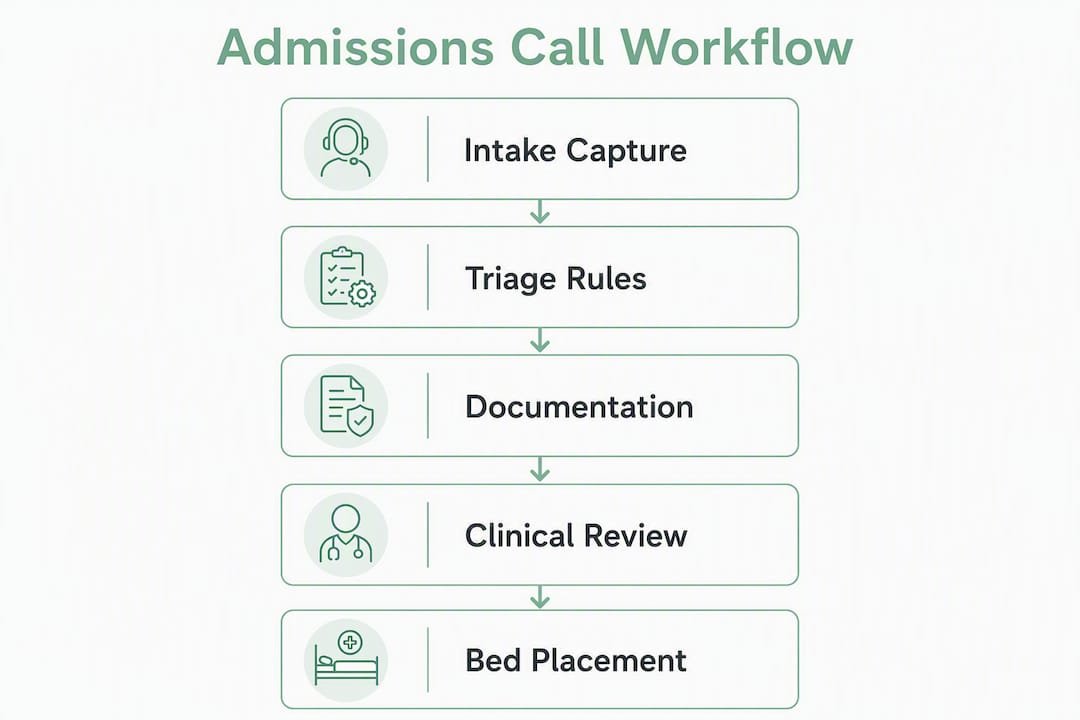
| Step | Role Owner | Routine SLA | Urgent/ED SLA |
|---|---|---|---|
| Intake capture | Referral coordinator | 15 minutes | 5 minutes |
| First-pass clinical review | Charge nurse / CM | 2 hours | 30 minutes |
| Payer eligibility check | Payer specialist | 2 hours | 1 hour |
| Final accept/decline decision | Admissions director | 4 hours | 1 hour |
| Bed hold / assignment | Bed manager | 30 minutes post-decision | Immediate |
| Transport scheduling | Coordinator | 2 hours post-accept | 30 minutes |
| Arrival confirmation + nursing handoff | Admitting nurse | At arrival | At arrival |
Escalation rule: if any SLA is missed, the next-level owner receives an automatic alert. For routine referrals, the admissions director is the escalation point. For urgent cases, the clinical supervisor and bed manager are notified simultaneously.
Tactics to reduce referral response time consistently show that parallel clinical and financial review — rather than sequential — is the single highest-impact process change most facilities can make without adding staff.
How do you close the loop with referring partners after every call?
Failing to communicate a decision — accepted or declined — is the leading cause of referral leakage. Every referral deserves a response, and that response should arrive within your stated SLA window.
Core principle: confirm receipt, state status, list next steps, and log the communication in your EMR or referral tracker.
Sample scripts:
- Acceptance call: “Hi [Name], this is [Your Name] from [Facility]. We have reviewed the referral for [Patient initials] and are pleased to accept. We are targeting [date/time] for arrival. Please send the discharge summary and authorization documents to [secure portal link]. Your point of contact is [Name] at [direct number].”
- Decline call: “Hi [Name], we have reviewed the referral and are not able to accommodate this patient at this time due to [clinical/capacity reason]. We want to stay a strong partner — please keep us in mind for future referrals, and feel free to call me directly if you have questions.”
- Pending/documentation request: “We need [specific document] before we can finalize the decision. Can you send that to [portal] by [time/date]? I will follow up at [time] if I have not received it.”
Pro Tip: Always end every call and every email with the single point-of-contact name and direct number. Referring partners who know exactly who to call back send more referrals.
Which KPIs tell you where referrals are leaking?
A compact KPI dashboard gives your leadership team the signal it needs without drowning coordinators in reports.
| KPI | Target Range | Review Cadence |
|---|---|---|
| Time to first response | Under 1 hour | Daily |
| Time to clinical review | Under 2 hours | Daily |
| Acceptance rate | Facility-specific baseline | Weekly |
| Conversion-to-admit rate | Track trend vs. prior period | Weekly |
| Bed fill time post-accept | Under one day | Weekly |
| Referral leakage by source | Zero unacknowledged referrals | Weekly |
| Missing-document rate | Under 10% at first contact | Weekly |
Collect data from your EMR referral module and your referral management platform. Run a daily operations huddle against the top three metrics; present the full dashboard to leadership weekly. When leakage spikes from a specific hospital partner, run a root-cause review: was it response time, a documentation gap, or a capacity issue?
Referral analytics that connect source-level leakage to occupancy outcomes let you run focused experiments — change one process variable, measure the lift in conversion over two to four weeks, and keep what works.
When should you automate your admissions call workflow?
Automation earns its place when manual work is creating measurable leakage or delay. Consider a pilot when your facility hits any of these thresholds:
- Staff spend more than 20 minutes per referral on data entry and document chasing
- More than 15% of incoming referral packets arrive incomplete
- Your referral leakage rate is rising despite process coaching
- Referral volume exceeds your coordinator capacity during peak hours
High-impact integrations to prioritize:
- EMR integration for single-source intake and no duplicate entry
- Real-time insurance eligibility verification against payer portals
- Document ingestion (PDF parsing) to auto-populate structured fields
- Secure messaging with hospital discharge planners
Feature checklist for any platform you evaluate:
- Automated first-pass extraction and routing rules
- Bed-hold management with auto-release timers
- Audit logging for HIPAA compliance
- SLA monitoring dashboards with escalation alerts
- Facility-specific decision rules and configurable triage criteria
Security and HIPAA compliance, integration options (FHIR, HL7), implementation timeline, and vendor support for your specific EMR are the non-negotiable evaluation criteria. Automated referral workflows show that automation is most valuable when it handles repeatable extraction and routing, freeing your clinical reviewers for judgment calls.
Smartadmissions implements EMR integration, real-time eligibility checks, document ingestion, and SLA dashboards in a single platform built for post-acute care. See how it works.
Pro Tip: Before selecting a platform, map your current workflow on paper first. Automating a broken process just makes the errors faster. Fix the triage criteria and SLA targets, then automate.
How do you roll out a new admissions process in 30–60–90 days?
A phased pilot keeps risk low and gives your team time to build confidence before full rollout.
Days 1–30: Map and baseline
- Document your current intake workflow step by step.
- Baseline your KPIs: response time, acceptance rate, missing-document rate.
- Select one pilot unit or one referring hospital partner.
- Set up data collection in your EMR or referral platform.
- Deliver role-based training: coordinators on the call checklist and scripts, clinical reviewers on triage criteria, payer specialists on eligibility workflows.
Days 31–60: Run the pilot
- Go live with the new call checklist and SLA targets on your pilot unit.
- Activate EMR integration and eligibility verification if selected.
- Monitor KPIs daily; hold a brief team huddle to surface friction points.
- Iterate scripts and templates based on coordinator feedback.
- Collect user feedback formally at the 45-day mark.
Days 61–90: Evaluate and scale
- Compare pilot KPIs against your baseline.
- Define go/no-go criteria: if response time dropped and conversion improved, proceed to full rollout.
- Finalize SOPs and update training materials.
- Schedule quarterly KPI reviews to sustain gains.
Pro Tip: Short, role-specific training modules (15–20 minutes each) with script practice and live-call shadowing drive faster behavior change than a single all-hands session. PointClickCare’s optimization guidance reinforces that first-hours documentation and level-of-care clarity are the two highest-leverage training topics.
Key Takeaways
Effective admissions call management requires a structured intake checklist, defined triage rules, SLA-driven workflows, and closed-loop communication with referring partners on every referral.
| Point | Details |
|---|---|
| Use a structured call checklist | Capture caller, clinical status, payer, and ETA promptly on every referral call. |
| Define three triage buckets | Automatic accept, automatic decline, and operator-review criteria prevent delays and inconsistent decisions. |
| Set and track SLAs | Target under one hour for first response and under four hours for a final decision on routine referrals. |
| Close the loop on every referral | Confirm receipt and communicate accept/decline status to referring partners to prevent referral leakage. |
| Smartadmissions for automation | Smartadmissions integrates EMR, real-time eligibility, and SLA dashboards to reduce manual entry and speed bed placement. |
Why Admissions 3.0 is the most important operational shift in post-acute care
Most facilities treat the admissions call as a clerical task. That framing is the root cause of most referral leakage, most bad-fit admits, and most strained hospital partnerships.
The Admissions 3.0 model, as Skilled Nursing News describes it, reframes intake as the clinical moment that sets downstream outcomes. A patient placed in the wrong facility because the intake call missed a ventilator dependency or an unverified payer generates a readmission, a denied claim, or both. Those are not billing problems — they are care problems that started on the phone.
What I see consistently is that facilities investing in structured intake, parallel review, and closed-loop communication with referring partners protect their reimbursement and their reputation simultaneously. The phone call is not overhead. It is the first clinical decision of the care episode.
Automation does not change that calculus — it supports it. When coordinators spend less time chasing fax confirmations and re-entering data, they spend more time on the calls that require judgment. That is the actual value of Admissions 3.0: not replacing human connection, but making room for it.
Smartadmissions cuts referral review time so your team can focus on patients
Faster bed placement starts with fewer manual steps between the referral call and the admission decision. Smartadmissions connects your EMR, payer portals, and referral intake into a single workflow — so coordinators capture structured data once, eligibility checks run automatically, and clinical reviewers see a decision-ready packet without chasing documents.
The platform’s SLA dashboards surface response-time gaps and leakage by referring source, giving your leadership team the data to run targeted process improvements rather than guessing where referrals are lost. For facilities ready to move from manual to automated intake, the manual vs. automated admissions comparison lays out the operational differences clearly.
Request a demo at smartadmissions.ai and see how your team can reduce referral review time and improve bed fill rates within your first 30-day pilot.
Useful sources
The resources below support specific sections of this playbook.
- Admissions: The Value Based Care Connection You May Be Missing — Skilled Nursing News. Supports the Admissions 3.0 framing and the case for connected intake workflows.
- How to Manage Incoming Referrals Effectively — SNFmetrics. Supports closing-the-loop communication SLAs and referral leakage prevention.
- Skilled Nursing Admissions Workflow: Faster Referral Response — ePeople.ai. Supports parallel clinical/financial review guidance and first-pass triage rules.
- 6 Steps to Optimizing Your Admission Process — PointClickCare. Supports the 30–60–90 day implementation checklist and training plan.
- SNF Shared Best Practices to Reduce Potentially Preventable Readmissions — Quality Health Associates of North Dakota / CMS-aligned guidance. Supports triage criteria and pre-admission huddle practices.
- How it works — Smartadmissions. EMR integration, eligibility verification, and automation feature overview.
- Step-by-step admissions workflow — Smartadmissions. Workflow templates and referral analytics supporting KPI tracking and pilot planning.
- 10 Admissions Coordinator Tips to Boost Patient Intake — Smartadmissions. Role-specific scripts and training outlines for coordinator onboarding.