
TL;DR:
- Implementing a unified, AI-assisted patient records workflow improves documentation accuracy and reduces admission delays. Centralizing referrals, integrating EMR through APIs, and setting clear SLAs accelerate bed occupancy and compliance. Combining automation with team-based practices increases revenue, staff retention, and operational efficiency in skilled nursing facilities.
A consolidated, EMR-integrated, AI-assisted patient records workflow cuts referral-to-admit time and documentation errors faster than any single process change your team can make. The prescription is straightforward: build a single-source-of-truth intake pipeline with role-based queues, integrated charting, and targeted automation for repetitive tasks. HIPAA and CMS compliance are non-negotiable guardrails throughout. Smartadmissions is purpose-built to deliver exactly this for skilled nursing and rehabilitation centers.
Your immediate next steps:
- Centralize all incoming referrals into one intake queue, eliminating email and fax silos
- Define minimum required data fields before a referral advances to clinical review
- Enable EMR integration via API, HL7, or FHIR to eliminate manual re-entry
- Assign clinical review SLAs (target: same-day for urgent referrals)
- Route admission decisions directly to bed assignment with a documented handoff
- Activate audit trails for every record change to satisfy HIPAA amendment requirements
Integrated charting produces an 87.9% agreement rate between coded diagnoses and narrative notes, compared to 44.4% with independent charting. That gap is where billing errors and denials are born.
Table of Contents
- Why does your patient records workflow affect revenue and staff retention?
- What does an end-to-end patient records workflow look like?
- What are the most common failure modes in medical records workflows?
- Where does automation deliver the fastest ROI in your admissions process?
- How do you select and test an EMR-integrated admissions platform?
- Which KPIs should you track to measure documentation workflow success?
- What does a realistic implementation timeline look like?
- Key Takeaways
- Why most facilities underestimate the documentation problem
- Smartadmissions cuts referral review time with built-in EMR integration
- Useful sources and further reading
Why does your patient records workflow affect revenue and staff retention?
Faster, accurate records directly improve bed fill rate, reduce claim denials, and lower staff burnout. These are not soft benefits. When your admissions team spends hours re-entering data from faxes into your EMR, or chasing missing labs by phone, every delay costs an occupied bed. Research confirms that EHR documentation now consumes a significant portion of clinician time, pulling staff away from patient interaction and contributing to burnout.

Documentation quality also determines coding accuracy. Poor workflow design produces heterogeneous agreement rates between clinical notes and billed diagnoses, which directly affects reimbursement and analytics downstream. Under HIPAA and CMS conditions of participation, missing or inaccurate records can trigger audits, payment delays, and compliance findings.
Pro Tip: If your team maintains a separate spreadsheet or shared inbox to track referral status, that shadow workflow is your single biggest source of delay. Eliminating it is the fastest win available to most facilities.
For a broader view of efficiency drivers in healthcare, the pattern is consistent: facilities that centralize and automate intake outperform those that rely on manual coordination.
What does an end-to-end patient records workflow look like?
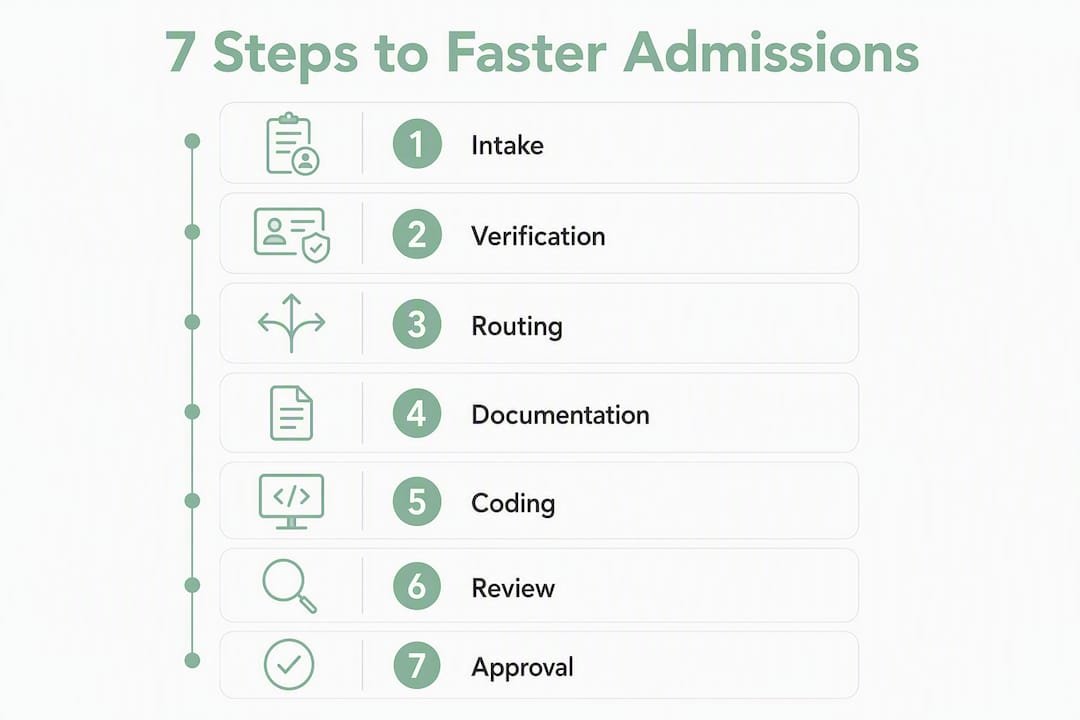
The canonical pipeline for skilled nursing and rehab admissions runs through six stages. Each stage has a defined owner, required data, and an acceptance criterion before the record advances.
Stage-by-stage checklist
- Referral intake: Receive referral via API ingestion, fax parsing, or portal. Log patient identifiers, referring provider, primary diagnosis (ICD-10), and payer information.
- Verification: Confirm insurance eligibility in real time, validate coverage for the level of care requested, and flag authorization requirements.
- Clinical review: Admissions coordinator routes the packet to a clinical reviewer. Reviewer assesses recent notes, medication list, labs, and functional status within the SLA window.
- Documentation and EMR entry: Use integrated charting to pull coded diagnoses into the narrative note. Avoid independent charting to prevent code-note mismatches.
- Admission decision and bed assignment: Clinical reviewer signs off; admissions coordinator confirms bed availability and assigns the unit. Notify the referring provider and family.
- Post-admit documentation and billing handoff: Complete the MDS assessment, finalize diagnosis codes, and transfer the record to billing with a clean handoff checklist.
Roles and SLA matrix
| Role | Responsibility | SLA Target |
|---|---|---|
| Admissions coordinator | Intake, verification, routing | Within 2 hours of referral receipt |
| Clinical reviewer | Clinical assessment, sign-off | Same day (urgent); same-day target (standard) |
| Unit staff | Bed prep, post-admit charting | Within 4 hours of admission |
| Billing | Coding review, claim submission | Within one day of admission |
Required intake data elements
| Data element | Source | Verified by |
|---|---|---|
| Patient identifiers (name, DOB, MRN) | Referral packet | Admissions coordinator |
| Insurance and payer ID | Insurance portal | Admissions coordinator |
| Primary and secondary diagnosis codes | Referring provider notes | Clinical reviewer |
| Recent clinical notes | EMR or fax | Clinical reviewer |
| Medication list | Referring provider | Clinical reviewer |
| Recent labs | Lab system or fax | Clinical reviewer |
Defining minimum acceptance data and clear SLAs for each handoff prevents repeated requests for basic information and keeps the pipeline moving.
Pro Tip: Use your EMR’s integrated charting feature, or a SmartLink-style tool, to pull coded diagnoses directly into narrative notes at the point of documentation. This single change narrows the gap between what clinicians document and what gets billed.
What are the most common failure modes in medical records workflows?
Four failure modes cause most delays and errors in skilled nursing and rehab admissions.
- Shadow workflows: Teams track referrals in email threads, shared spreadsheets, or fax logs outside the EMR. The symptom is repeated phone calls to confirm status. The fix is a centralized referral tracking system with a single queue visible to all roles.
- Independent charting: Clinicians write narrative notes without referencing coded diagnoses, producing the 44.4% agreement rate cited above. The fix is integrated charting with diagnosis codes pre-populated in the note template.
- Manual re-entry: Staff re-type data from faxes or PDFs into the EMR. Every keystroke is an error opportunity. The fix is API ingestion or structured fax parsing that maps fields directly to EMR data elements.
- Missing SLAs: No defined turnaround time means referrals stall at handoff points. The fix is written SLAs for each role, tracked in your admissions platform’s dashboard.
For amendments and corrections, HIPAA requires that the original entry remain visible and that any correction be dated, timed, and attributed to the person making the change. Never overwrite a prior entry. Your EMR’s audit trail must capture every modification automatically.
Risk note: Copy/paste errors are among the most common sources of clinical inaccuracy in EHR documentation. Structured templates and integrated charting reduce the opportunity for unchecked copy/paste by anchoring notes to verified diagnosis codes.
Unified systems integrated with the EMR enable real-time tracking across all handoffs and eliminate the manual re-entry that shadow workflows create.
Where does automation deliver the fastest ROI in your admissions process?
Automation yields the fastest return when it eliminates manual re-entry, powers eligibility checks, and routes referrals to the correct clinical queue. The sequence matters.
- Data ingestion: Connect referral sources via API, structured fax parsing, or direct EMR feed. Map incoming fields to your EMR’s data model automatically.
- Eligibility verification: Run real-time insurance checks against payer portals at the moment a referral arrives, not hours later.
- Routing: Apply rule-based logic to assign referrals to the correct clinical queue based on diagnosis, payer, and level of care.
- AI-assisted summary generation: Use an AI assistant to draft a clinical summary from the intake packet, flagging missing data for human review.
- Human-in-the-loop sign-off: A clinical reviewer approves, edits, or rejects the AI-generated summary before it enters the EMR. This step is non-negotiable for patient safety and HIPAA accountability.
Pro Tip: Deploy AI assistants to reduce the time clinicians spend on documentation, not to replace clinical judgment. The goal is to give your reviewer a pre-populated, structured summary to edit, not a finished note to rubber-stamp.
Pairing technology with team-based documentation models produces better outcomes than automation alone. Scribes, structured templates, and shared charting responsibilities restore clinician time with patients while maintaining documentation quality. For practical healthcare workflow automation examples, the pattern is consistent across facility types.
HIPAA compliance checklist for automation vendors:
- Business Associate Agreement (BAA) in place before any PHI is processed
- Data encrypted in transit (TLS 1.2 or higher) and at rest (AES-256)
- Audit trails for every automated action, with timestamps and user attribution
- Role-based access controls limiting PHI visibility to authorized staff
- Documented data breach notification procedures meeting the 60-day HIPAA window
For revenue cycle implications, AI in revenue cycle management reduces administrative burden and speeds cash flow when integrated with admissions automation.
How do you select and test an EMR-integrated admissions platform?
Prioritize EMR-native integration, HIPAA-compliant APIs, role-based permissions, and measurable SLA guarantees when evaluating any admissions platform.
Vendor evaluation checklist:
- Integration methods supported: HL7 v2, FHIR R4, direct API, or structured fax
- Bidirectional data mapping with your specific EMR (not just generic HL7 support)
- Role-based permission model with field-level access controls
- Audit trail completeness: every read, write, and amendment logged
- Onboarding support: dedicated implementation manager and training resources
- Analytics and reporting: referral-to-admit time, bed fill rate, and documentation time visible in a dashboard
Integration testing plan:
- Sandbox test with synthetic referral packets covering all payer and diagnosis types
- End-to-end admit simulation: referral receipt through billing handoff
- Data mapping validation: confirm all required fields populate correctly in the EMR
- Security review: vendor penetration test results and SOC 2 Type II report
- User acceptance testing (UAT) with admissions coordinators and clinical reviewers against defined SLA targets
For a deeper look at EMR integration methods and benefits, the architecture choices made at vendor selection determine how much manual work remains after go-live.
Pro Tip: Include data ownership and portability terms in your vendor contract before signing. Confirm you can export your full referral history and patient records in a standard format if you change platforms.
Which KPIs should you track to measure documentation workflow success?
Track referral-to-admit time, documentation time per admission, bed fill rate, coding accuracy, and referral conversion rate. These five metrics cover the clinical, operational, and financial dimensions of your intake process.
| KPI | Definition | Measurement method | Sample target | Reporting cadence |
|---|---|---|---|---|
| Referral-to-admit time | Hours from referral receipt to bed assignment | Admissions platform timestamp | Same day | Daily |
| Documentation time per admission | Minutes spent on charting per admit | EHR time-on-chart metadata | Under one hour | Weekly |
| Bed fill rate | Occupied beds as a percentage of licensed capacity | Census report | Above 80% | Daily |
| Coding accuracy rate | Percentage of notes with diagnosis-code agreement | Integrated charting audit | 87.9% | Monthly |
| Referral conversion rate | Percentage of referrals that result in admission | Admissions platform report | Above 60% | Weekly |
Collect baseline data for each metric during the two weeks before any system change. Without a baseline, before/after comparisons are not credible. Executive dashboards should surface referral-to-admit time and bed fill rate daily; coding accuracy and conversion rate can run on a weekly or monthly cycle.
For more on referral tracking and bed occupancy, the relationship between faster intake and higher fill rates is direct and measurable.
What does a realistic implementation timeline look like?
A typical implementation follows five phases and runs 8–16 weeks, depending on EMR complexity and the number of referral sources your facility manages.
- Discovery (weeks 1–2): Map current workflow, identify shadow workflows, define minimum intake data fields, and document EMR integration requirements. Involve admissions director, IT lead, and clinical reviewer.
- Pilot (weeks 3–5): Configure the platform with a subset of referral sources. Run synthetic and live referrals. Measure baseline KPIs.
- Full integration (weeks 6–9): Connect all referral sources, complete EMR data mapping, and activate eligibility verification. Complete security review.
- Staff rollout (weeks 10–13): Train all admissions coordinators, clinical reviewers, and unit staff. Assign workflow champions for each role.
- Optimization (weeks 14–16): Review KPI data, adjust SLAs, and close any remaining shadow workflows.
Primary cost drivers: platform licensing, integration engineering hours (higher for complex or legacy EMRs), staff training time, and data migration. The most common escalation point is EMR data mapping when the facility uses a heavily customized instance.
Change-management checklist:
- Schedule role-specific training before go-live, not during
- Designate one workflow champion per shift to answer peer questions
- Run a two-week feedback loop after go-live with a weekly check-in
Pro Tip: A focused two-week pilot on eligibility verification alone typically demonstrates ROI before full deployment. Run it, measure the time saved, and use that data to build internal support for the full rollout.
Key Takeaways
An EMR-integrated, AI-assisted patient records workflow with integrated charting and role-based queues is the single most effective change skilled nursing and rehab admissions teams can make to cut errors and speed bed occupancy.
| Point | Details |
|---|---|
| Integrated charting accuracy | Integrated charting produces an 87.9% diagnosis-code agreement rate vs. 44.4% with independent charting. |
| Eliminate shadow workflows | Centralizing referrals into one queue removes the email and spreadsheet silos that delay review. |
| Automate eligibility first | Real-time insurance verification at intake is the fastest automation ROI for most facilities. |
| Track 5 core KPIs | Monitor referral-to-admit time (target: same-day) and documentation time (target: under one hour) weekly. |
| Smartadmissions platform | Smartadmissions integrates with major EMRs, automates eligibility checks, and provides audit-ready documentation for HIPAA compliance. |
Why most facilities underestimate the documentation problem
The conventional wisdom in skilled nursing administration is that bed fill rate is a census and marketing problem. It is not. The bottleneck is almost always documentation: a referral sitting in a clinical reviewer’s inbox because the intake packet is incomplete, or a claim denied because the coded diagnosis does not match the narrative note. Fixing the workflow is the revenue intervention most facilities have not tried yet.
What administrators often miss is that technology alone does not close this gap. Pairing an AI-assisted platform with team-based documentation practices, clear SLAs, and a genuine change-management plan produces durable results. A platform that automates eligibility checks but leaves shadow workflows intact will see its gains erode within months as staff revert to familiar habits.
The two-week eligibility pilot described in the implementation timeline is not a workaround. It is a deliberate proof-of-concept that builds internal credibility before asking your team to change everything at once. Start there, measure the result, and let the data make the case for the next phase.
Smartadmissions cuts referral review time with built-in EMR integration
Faster admissions start with fewer manual steps. Smartadmissions connects directly to your existing EMR via HL7 and FHIR, ingests referrals from multiple sources automatically, and runs real-time insurance eligibility checks the moment a referral arrives. Your clinical reviewers receive a pre-populated, AI-assisted summary, not a stack of faxes to decode.
The platform maintains a complete, HIPAA-compliant audit trail for every record action, supports role-based access controls, and surfaces referral-to-admit time and bed fill rate in a live dashboard. Onboarding is structured and supported, with implementation guidance designed for admissions teams, not IT departments.
If your facility is ready to move from manual intake to a documented, measurable process, start with referral documentation best practices or see how automated admissions compares to manual workflows before booking a demo.
Useful sources and further reading
- The Impact of Documentation Workflow on the Accuracy of the Coded Diagnoses in the Electronic Health Record — Primary evidence for integrated charting accuracy rates; use this to justify workflow redesign to clinical leadership.
- Electronic Health Records, Physician Workflows and System Change — Covers EHR-clinician misalignment, burnout drivers, and team-based documentation strategies; relevant to the automation playbook and why-it-matters sections.
- Medical Records Management: A Complete Guide — Practical guide covering shadow workflows, automation ROI, and end-to-end visibility; useful for implementation planning.
- Strategies and Tools for EHR and Physician Workflow Alignment: Protocol for a Scoping Review — Reviews tools including speech recognition, order-set optimization, and scribes; supports the automation playbook.
- HHS Policy for Records Management — Authoritative U.S. federal framework for electronic records lifecycle, retention, and disposition requirements.
- Clinical Order Workflows, HL7 FHIR Implementation Guide — Technical reference for FHIR-based referral and order workflows; relevant for vendor integration testing.