
A complete digital patient/referral packet is a structured, interoperable record containing essential clinical, administrative, and authorization data transmitted via C-CDA or FHIR standards, with a named owner at every stage. The fastest way to prepare one is to load a standardized intake template into an interoperable referral management system, such as Smartadmissions, and run clinical, payer, and operational reviews in parallel rather than sequentially.
Every admit-ready packet must include:
- Clinical summary with primary diagnosis, comorbidities, and functional status
- Medication list and reconciliation with allergies and adverse reactions
- Discharge summary from the referring hospital
- Recent labs, imaging, and vitals (within 30–72 hours of transfer)
- Therapy evaluation notes and rehabilitation goals
- Code status and advance directives
- Cognitive and behavioral baseline (critical for patients with dementia or ADRD).
- Insurance, prior authorization status, and payer contacts
- Patient demographics and attending/primary clinician contacts
- Outstanding or pending test results flagged for follow-up
Table of Contents
- What does an admissions-ready patient packet checklist look like?
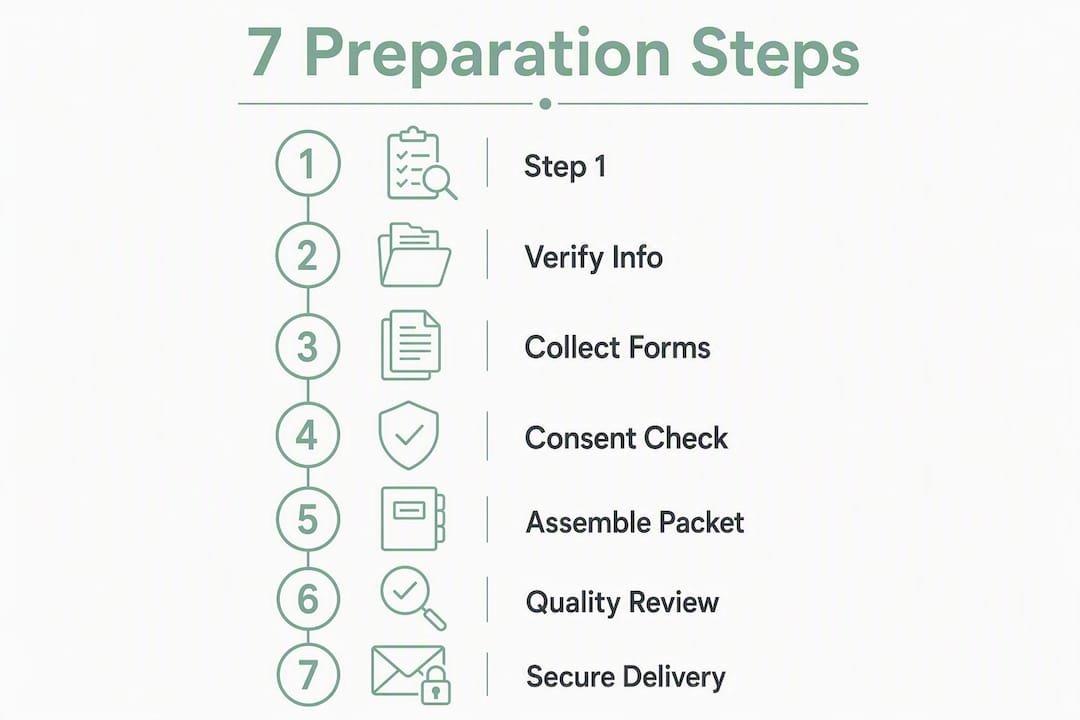
- How to prepare patient packets step by step
- Which technology options support EMR-integrated packet delivery?
- How do you catch and fix packet errors before clinical review?
- What SLAs and KPIs should your team track?
- What fields and documents belong in your packet template?
- How do you roll out this process at your facility?
- Key Takeaways
- The part most facilities underestimate
- Smartadmissions turns this checklist into a live workflow
- Useful sources and standards to consult
What does an admissions-ready patient packet checklist look like?
Research from JAMA Network Open found that 49.6% of hospital-SNF pairs did not consistently receive at least 19 of 23 critical information types. The items most often missing are exactly the ones that stall clinical review.
Required documents:
- Discharge summary (SNF-tailored, not a generic hospital default)
- Medication list and medication reconciliation form
- Physician orders at time of transfer
- Therapy evaluation notes (PT, OT, SLP)
- Recent vitals, labs, and imaging reports
- Cognitive baseline and behavioral status assessment
- Code status documentation and advance directives
Required administrative fields:
- Full patient demographics (name, DOB, MRN, contact)
- Primary payer, secondary payer, and Medicare/Medicaid ID
- Prior authorization number and approval status
- Guarantor information
- Hospital social worker or case manager contact for after-hours questions
Items frequently missing in practice:
| Item | Verification Flag |
|---|---|
| Behavioral/psychiatric status | Confirm with hospital social worker before packet closes |
| Immunization history | Request from PCP or hospital infection control |
| Pending lab or imaging results | Flag as “awaiting” with expected turnaround time |
| Cognitive baseline (MMSE or BIMS) | Required for ADRD patients; escalate if absent |
Every packet transmission must include a HIPAA-compliant consent metadata record: patient authorization for PHI disclosure, the receiving facility’s NPI, and an audit timestamp.

How to prepare patient packets step by step
Effective referral intake starts with a standardized first-pass review that surfaces diagnosis, payer, skilled need, red flags, and missing documents within minutes, not hours.
-
Capture and timestamp the referral. Log the referral source, date, time, and channel (EMR portal, fax, phone) immediately. Automated intake systems can capture this on receipt.
-
Run the initial completeness check. Compare received documents against your required-fields template. Flag any missing items automatically and assign a follow-up owner.
-
Triage into three buckets. Auto-accept referrals that meet all clinical and payer criteria. Auto-decline those that fall outside facility scope (e.g., services not offered). Escalate all others to a human reviewer within 30 minutes.
-
Launch parallel reviews. Clinical, payer, and operational reviews run simultaneously, not in sequence. This single change eliminates the most common bottleneck in packet preparation.
-
Automate missing-item flags. The system sends templated requests to the hospital contact for any outstanding documents, with a defined SLA for response.
-
Finalize and validate the packet. A designated admissions owner confirms all fields are complete, cross-checks medication list against active orders, and clears the packet for clinical decision.
-
Execute the handoff. Transmit the completed packet via the agreed integration channel (FHIR API, C-CDA, or secure file transfer), log the transmission, and confirm receipt.
Role responsibility matrix:
| Role | Owns | Target Time |
|---|---|---|
| Referral coordinator | Intake logging, completeness check | Within minutes of receipt |
| Clinical reviewer | Clinical summary, therapy needs, code status | Within 2 hours |
| Payer reviewer | Insurance verification, prior auth | Within 2 hours (parallel) |
| Admissions director | Final acceptance decision | Within 4 hours of receipt |
Which technology options support EMR-integrated packet delivery?
Shared EHR portals and HIE access improve timeliness and data usability, yet many SNFs still depend on fax workflows that create avoidable bottlenecks. Choosing the right integration layer matters.
| Integration Method | Best For | Key Requirement |
|---|---|---|
| View-only EHR portal | Low-volume facilities, quick setup | Hospital grants SNF read access |
| FHIR/C-CDA push API | High-volume, structured data exchange | EMR vendor support on both sides |
| Secure SFTP/HTTPS file exchange | Mid-tier facilities, batch transfers | Encrypted channel, audit log |
| Fax with automated ingestion | Legacy fallback only | OCR parsing into intake queue |
All transmission methods must meet HIPAA-compliant channel requirements: end-to-end encryption, user authentication, and a complete audit trail. Auditability is not optional; CMS audits and payer reviews routinely request transmission logs as proof of timely and complete documentation.
For fax fallback, configure an automated ingestion workflow that parses incoming faxes via OCR and routes them into the intake queue with a timestamp, rather than landing in a shared inbox.
Pro Tip: Prioritize integrations that deliver structured medication lists and discrete problem lists over those that send only PDF attachments. Structured data allows automated cross-field validation; PDFs require manual review and introduce transcription errors.
Learn more about healthcare interoperability and how integration choices affect admission speed.
How do you catch and fix packet errors before clinical review?
Automation is most effective when it handles repetitive validation tasks and surfaces exceptions for human judgment, rather than replacing clinical decision-making entirely.
-
Apply required-field validation. Every mandatory field must be populated before the packet advances. The system blocks progression and notifies the intake coordinator.
-
Run cross-field checks. Compare the medication list against active physician orders. Flag discrepancies between expected discharge date and actual transfer date. Confirm allergy entries do not conflict with listed medications.
-
Flag duplicate or conflicting entries. Automated rules catch duplicate allergy records or conflicting code status entries and route them to the clinical reviewer for resolution.
-
Escalate unresolved items. If the hospital contact does not respond within the defined SLA, escalate to the admissions director and document the attempt.
Sample missing-info request message:
Reducing referral errors at the intake stage prevents downstream denials and admission-day documentation gaps.
What SLAs and KPIs should your team track?
Medicare fee-for-service generates a large number of hospital-to-SNF referrals annually, several thousand per day. At that volume, even small SLA gaps compound into significant bed-fill losses.
| SLA Target | Metric | Operational Impact |
|---|---|---|
| First response within 30 minutes | Time from referral receipt to acknowledgment | Reduces referral leakage to competing facilities |
| Packet completion within 4 hours | Time from receipt to admit-ready status | Faster bed fill, fewer same-day cancellations |
| Missing-doc follow-up within 1 hour | Time from flag to outbound request | Prevents clinical review delays |
| Payer verification within 2 hours | Time from receipt to authorization confirmation | Avoids late-discovery denials |
KPIs to monitor weekly:
- Packet completeness rate: percentage of referrals arriving with all required fields
- Time-to-decision: average hours from referral receipt to accept/decline
- Referral leakage rate: percentage of referrals lost to other facilities
- Admission-day documentation errors: number of missing or incorrect fields discovered at admit
What fields and documents belong in your packet template?
Referral intake paperwork is the backbone of post-acute admissions; missing or delayed documents lead to stalled admissions, redundant work, and patient safety risk.
Core field template:
- Patient identifiers: full name, DOB, MRN, SSN (last 4), insurance ID
- Encounter details: admitting diagnosis, ICD-10 codes, admission and expected discharge dates
- Medications: name, dose, route, frequency, last administered
- Allergies: allergen, reaction type, severity
- Recent vitals: BP, HR, O2 sat, weight (within 72 hours)
- Labs and imaging: CBC, BMP, chest X-ray, wound photos if applicable
- Therapy goals: PT/OT/SLP evaluation and short-term goals
- Code status: full code, DNR, DNI, POLST form
- Clinician contacts: attending physician, hospitalist, case manager
Document set that travels with every packet:
Discharge summary, medication reconciliation form, therapy evaluations, physician transfer orders, prior authorization documents, and advance directive copies.
For facilities using SNF-tailored discharge templates shared with high-referring hospitals, JAMA Network Open research confirms this is a practical step that improves information usability for post-acute providers.
Save this template as a reusable EMR intake form or CSV and propagate it into your referral vendor portal so every incoming packet is validated against the same field set automatically.
How do you roll out this process at your facility?
Centralizing referrals, standardizing intake requirements, and assigning clear ownership are the operational foundations that make a packet process repeatable and auditable.
-
Define pilot scope. Select 1–2 high-referring hospitals. Run the new packet workflow for 4–6 weeks before full rollout.
-
Capture baseline metrics. Record current time-to-decision, packet completeness rate, and referral leakage before the pilot begins. These numbers are your proof of improvement.
-
Train admissions teams. Cover intake logging, completeness checks, escalation rules, and the missing-info request template. Run at least two mock referral exercises before go-live.
-
Train hospital liaisons. Share the SNF-tailored discharge template with case managers at pilot hospitals. Explain what fields your facility needs and why.
-
Set leadership checkpoints. Review KPIs weekly during the pilot. Adjust SLA targets and template fields based on what the data shows.
-
Iterate and expand. Once the pilot hospitals hit target completeness rates, roll the process out to all referral sources. Document the playbook so new staff can onboard in days, not weeks.
For practical time-saving tactics during rollout, the post-acute care automation guide covers five automation approaches that reduce per-referral handling time.
Key Takeaways
A complete, admit-ready digital patient packet requires standardized templates, parallel reviews, HIPAA-compliant transmission, and measurable SLAs tracked weekly to prevent referral leakage and admission-day errors.
| Point | Details |
|---|---|
| Standardize the template first | Build a required-field template covering clinical, administrative, and authorization items before any technology change. |
| Run reviews in parallel | Clinical, payer, and operational reviews run simultaneously to cut time-to-decision from hours to under four hours. |
| Prioritize structured integrations | FHIR and C-CDA push APIs deliver discrete, validatable data; PDF-only workflows require manual review and introduce errors. |
| Track four core KPIs | Monitor packet completeness rate, time-to-decision, referral leakage, and admission-day errors weekly. |
| Smartadmissions automates the workflow | Smartadmissions maps automated intake parsing, parallel queues, EMR/FHIR integration, and eligibility checks directly to this checklist. |
The part most facilities underestimate
The operational gains from parallel review and structured templates are real and measurable. What admissions leaders consistently underestimate is how much of the delay lives in the handoff between roles, not in any single review step.
When clinical review finishes before payer verification even starts, the packet sits idle. When the payer team clears authorization before the clinical reviewer has signed off, the same thing happens. The bottleneck is sequencing, and no amount of training fixes a serial queue.
The second underestimated factor is cognitive and behavioral documentation. Patients with dementia or ADRD cannot self-report baseline status, so when that field arrives blank, the clinical reviewer has no proxy. The result is either a delayed decision or an admit with incomplete risk information. Making cognitive baseline a hard-required field, rather than a soft recommendation, is the single template change with the highest patient safety return.
Change management is straightforward once the template and parallel queue are in place. The real work is the first two weeks of the pilot, when staff revert to old habits under pressure. Weekly leadership checkpoints and a documented escalation playbook are what hold the process together during that period.
Smartadmissions turns this checklist into a live workflow
Faster admits start with fewer back-and-forths, and Smartadmissions is built specifically to eliminate them for SNFs, rehabilitation centers, and post-acute providers.
The platform’s automated intake parsing extracts and maps incoming referral data against your required-field template the moment a packet arrives, flagging missing items before any reviewer touches the file. Parallel review queues route clinical, payer, and operational tasks simultaneously. Native FHIR and C-CDA integration means structured medication lists and discrete problem lists flow directly into your EMR, not into a PDF inbox. Real-time insurance eligibility verification catches authorization gaps in the same window as clinical review, not after.
The result is a measurable reduction in time-to-decision and referral leakage, with HIPAA-compliant audit trails built into every transmission. Onboarding is supported by a dedicated customer success team, and the platform is configurable to your facility’s specific intake rules without requiring IT resources.
See how automated admissions and referral documentation best practices translate into faster bed occupancy, then request a pilot evaluation for your facility.
Useful sources and standards to consult
The following references provide authoritative guidance on hospital-to-SNF transitions, interoperability standards, and admissions documentation requirements.
“Shared EHR portals and health information exchange access are primary enablers for timely, higher-quality hospital-SNF transitions — yet many facilities remain on fax-based workflows that create preventable bottlenecks in referral intake.”
AJMC: Motivating and Enabling Factors Supporting Targeted Improvements to Hospital-SNF Transitions
- JAMA Network Open: Information Sharing Practices Between US Hospitals and SNFs — evidence on which of the 23 critical information types are most frequently missing; use for checklist validation and QC rule design.
- AJMC: Hospital-SNF Transition Enablers — policy background on IT infrastructure, HIE access, and transition quality improvement.
- HL7 FHIR R4 specification — the interoperability standard governing structured data exchange between hospital EHRs and SNF intake systems.
- Smartadmissions: Patient Intake Checklist for Skilled Nursing Homes — downloadable template and field mapping resource for implementation teams.
This article provides general operational guidance for healthcare admissions professionals. Confirm current CMS documentation requirements, HIPAA regulations, and payer-specific authorization rules with your compliance officer or a qualified healthcare attorney before implementing changes.